
PROBLEM
Hyperlinks in ArcGIS Dashboards elements redirect to the incorrect web pages
Description
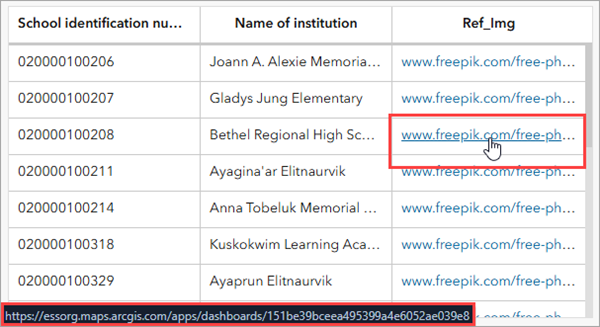
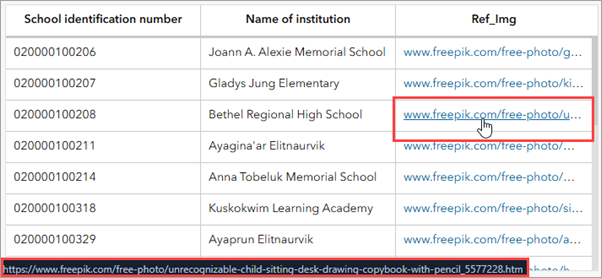
In ArcGIS Dashboards, when URLs stored in an attribute field are configured as hyperlinks using advanced formatting within a dashboard element, clicking the link redirect to the dashboard view page instead of opening the intended web page. The image below displays an example of the issue on a dashboard view page, with the browser status bar preview showing an incorrect URL when hovering over the configured hyperlink in a table element.
Cause
The URLs stored in the attribute table do not include the https scheme, causing ArcGIS Dashboards to recognize the link as a relative URL to the dashboard, hence redirects to the dashboard view page.
Solution or Workaround
Update the attribute values in the hosted feature layer
This workaround modifies the original attribute data and is recommended when updating the hosted feature layer is feasible.
- Log in to ArcGIS Online.
- On the Content > My content tab, click the desired hosted feature layer item to open the item detail page.
- Update the attribute value to include the https scheme to the URL attribute values.
- On the item detail page, click the Data tab.
- On the Data tab, on the URL attribute field header, click Menu
 and click Calculate.
 - Under Select language, click Arcade.
- Under Define filter (optional), click Next.
- Under Arcade expression, paste the following expression and replace <field name> with the URL attribute field.
"https://" + $feature.<field name>
- Click Run calculation.
- In ArcGIS Dashboards, refresh the dashboard view page to reflect the changes.
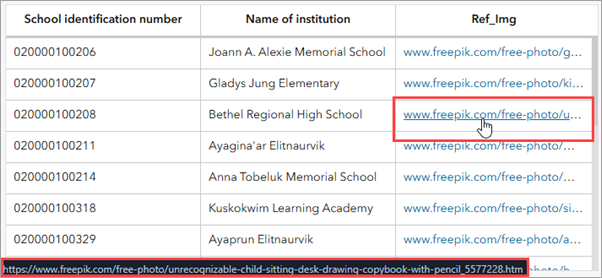
The correct URL is displayed on the browser status bar preview when hovering over the hyperlink in the table element on the dashboard view page.
Update the advanced formatting expression in the dashboard element
This workaround applies the missing https scheme to the URLs in a specific dashboard element by updating the advanced formatting expression and is recommended when retaining the original attribute data in the hosted feature layer is necessary. In this example, the hyperlinks are configured in a table element.
- Open the dashboard edit page.
- On the dashboard view, hover over the ellipsis in the upper left corner of the table element and click Configure
 .
. - Update the advanced formatting expression.
- In the table configuration window, click the Values tab.
- Update the expression by including the https scheme to the hyperlink using the Concatenate function and the Addition arithmetic operator. Paste the following expressions at the top of the advance formatting editor. Replace <variable a> and <variable b> with the desired variables, and <field name> with the URL attribute field.
var <variable a> = Concatenate("https://",$datapoint.<field name>)
var <variable b> = '<a href="' + <variable a> + '" target="_blank">' + $datapoint.<field name> + '</a>'
- Apply the final expression by assigning the variable to the displayText property of the hyperlink column. Refer to ArcGIS Dashboards: Format tables for more information.
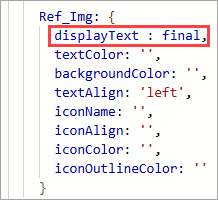
The code below is the full displayText property assigned with the final variable from Step 3(b). In this example, the variable, set as final is assigned to the Ref_Img column.
displayText : final,
Note:
Optionally, remove the unrelated properties from the editor.
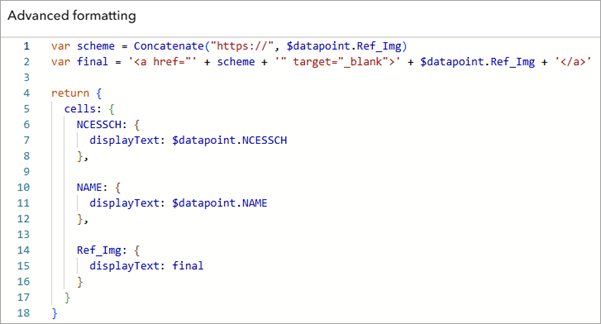
The following shows the complete expression used in this workflow, with the unnecessary properties removed from the expression.
var scheme = Concatenate("https://", $datapoint.Ref_Img)
var final = '<a href="' + scheme + '" target="_blank">' + $datapoint.Ref_Img + '</a>'

return {
  cells: {
    NCESSCH: {
      displayText: $datapoint.NCESSCH
    },
    NAME: {
      displayText: $datapoint.NAME
    },
    Ref_Img: {
      displayText: final
    }
  }
}
- Click Done.
- In the dashboard layout panel, click Save
 > Save to save the changes.
 - In ArcGIS Dashboards, refresh the dashboard view page to reflect the changes.
The correct URL is displayed on the browser status bar preview when hovering over the hyperlink in the table element on the dashboard view page.
Article ID: 000039554
- ArcGIS Online
- ArcGIS Dashboards
Get support with AI
Resolve your issue quickly with the Esri Support AI Chatbot.


Related Information
Discover more on this topic

Search for related information

Find training related to this topic

Explore ideas and give feedback
Get help from ArcGIS experts
Start chatting now