
PROBLEM
Running Setup.exe on Windows 11 25H2 fails to run the patches required to upgrade the product
Description
Some ArcGIS releases require a patch (MSP) to be installed on the existing installation before an upgrade can take place. The required patches for an upgrade are usually installed by Setup.exe. On Windows 11 25H2, the patches are not installed by Setup.exe, and as result the MSI is launched, and returns a message that a patch is required to upgrade.
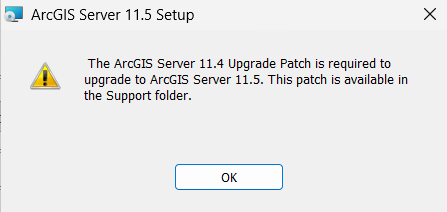
For example, when upgrading ArcGIS Server, the following message is returned:
The ArcGIS Server 11.4 Upgrade Patch is required to upgrade to ArcGIS Server 11.5. This patch is available in the Support folder.
The affected installations are as follows:
- ArcGIS Notebook Server: Upgrade from 11.3 to 11.4/11.5
- ArcGIS Server: Upgrade from 11.3 to 11.4/11.5 or 11.4 to 11.5
- ArcGIS Video Server: Upgrade from 11.3 to 11.4/11.5
- ArcGIS Mission Server: Upgrade from 10.9 to 11.4/11.5
Cause
Setup.exe isn’t correctly identifying Windows 11 25H2 as a supported operating system.
Solution or Workaround
Manually install the patches and run the Setup.exe again. The patches required for the upgrade can be found with the other setup files.
Patches can be found in the extracted setup files location such as:
C:\Users\<userprofile>\Documents\...\SetupFiles\Support\Patch
Article ID: 000038958
- ArcGIS Enterprise
Get support with AI
Resolve your issue quickly with the Esri Support AI Chatbot.


Related Information
Discover more on this topic

Search for related information

Find training related to this topic

Explore ideas and give feedback
Get help from ArcGIS experts
Start chatting now