
PROBLEM
ArcGIS Enterprise Builder fails to upgrade on Windows 11 25H2
Description
ArcGIS Enterprise Builder requires a patch (MSP) to be installed on the existing installation before an upgrade can take place. The required patches for an upgrade are usually installed by Builder.exe. On Windows 11 25H2, the patches are not installed by Builder.exe, and as result the ArcGIS Server component will fail to upgrade.
ArcGIS Enterprise Builder 11.4 and 11.5 are affected by this issue. An upgrade from 11.3 to 11.4/11.5 or 11.4 to 11.5 is affected, due to a required ArcGIS Server upgrade patch that is not installed on Windows 11 25H2 by the Enterprise Builder setup.
Cause
Builder.exe isn’t correctly identifying Windows 11 25H2 as a supported operating system.
Solution or Workaround
Do not upgrade ArcGIS Enterprise Builder on Windows 11 25H2 without first installing the required ArcGIS Server patch. This applies to the Server component upgrade from 11.3 to 11.4/11.5 or 11.4 to 11.5. Run the Server patch before upgrading.
Patches can be found under the SetupFiles\Server folder, as shown in the image below. For example:
\SetupFiles\Server\SetupFiles\Support\Patch
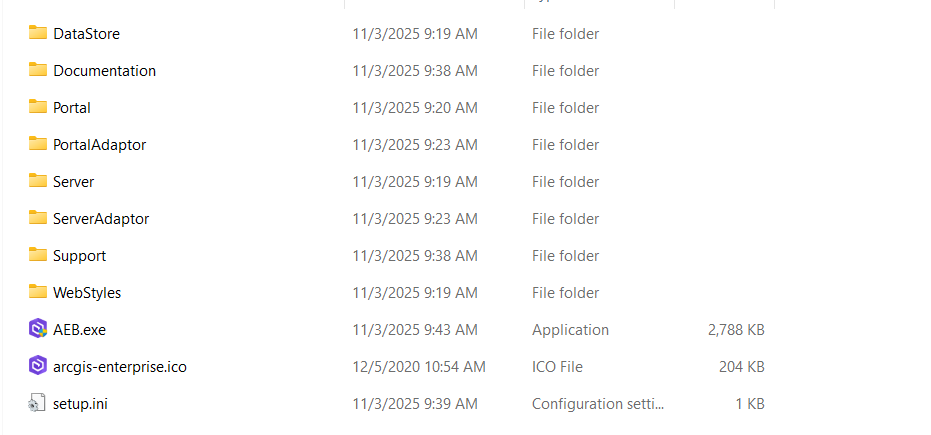
The Patch folder contains the .msp files for the patches.
- Run the patch that is appropriate for the version being upgraded from. For example, when upgrading from ArcGIS Enterprise Builder version 11.4 to 11.5, run the patch named ArcGIS-114-S-EBU-Patch.msp, as shown in the next image.
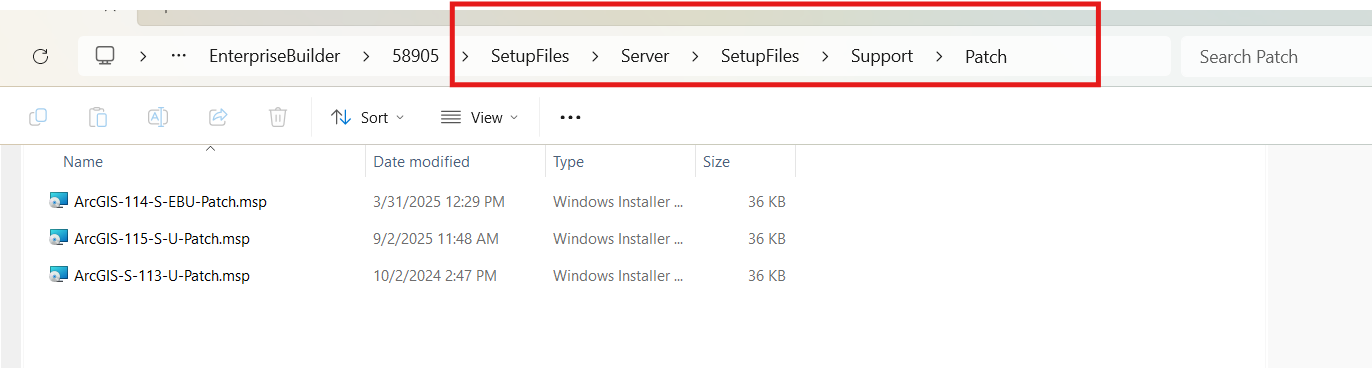
- Once the appropriate patch has been installed, run Builder.exe to complete the upgrade.
Article ID: 000039138
Get support with AI
Resolve your issue quickly with the Esri Support AI Chatbot.


Related Information
Discover more on this topic

Search for related information

Find training related to this topic

Explore ideas and give feedback
Get help from ArcGIS experts
Start chatting now