
PROBLEM
When running Setup.exe for ArcGIS Web Adaptor (IIS) on Windows 11 25H2, only one instance can be installed
Description
When running Setup.exe for versions 11.4 or 11.5 for ArcGIS Web Adaptor (IIS) or ArcGIS Enterprise Web Adaptor (IIS) on Kubernetes, only one instance can be installed, instead of the ability to install multiple instances. The following behavior is observed:
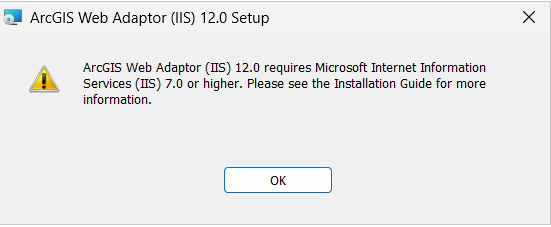
When running Setup.exe, if IIS is not configured, a message to install IIS is returned:
"ArcGIS Web Adaptor (IIS) 12.0 requires Microsoft Internet Information Services (IIS) 7.0 or higher. Please see the Installation Guide for more information."
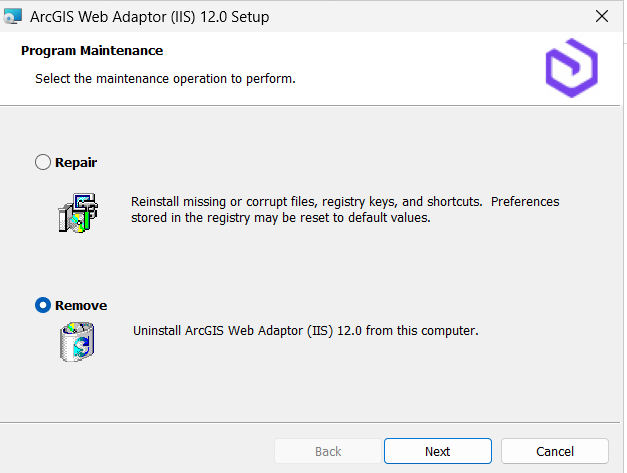
If IIS is already configured, running Setup.exe cannot be used to install more than one instance on the same port. The setup goes into the Remove/Repair dialog, as shown in the image below.
Cause
Setup.exe isn’t correctly identifying Windows 11 25H2 as a supported operating system.
Solution or Workaround
- Run ConfigureIIS.exe manually:
ArcGIS Web Adaptor (IIS): ConfigureIIS.exe can be found in the extracted setup files location such as:
C:\Users\<userprofile>\Documents\ArcGIS 11.5\WebAdaptorIIS\SetupFiles\Support
ArcGIS Enterprise on Kubernetes Web Adaptor (IIS): ConfigureIIS.exe can be found in the extracted setup files location such as:
C:\Users\<userprofile>\Documents\ArcGIS 11.5\KubernetesWebAdaptorIIS\SetupFiles\Support
- Run setup.msi from the command line, as follows:
msiexec /i setup.msi MSINEWINSTANCE=1 TRANSFORMS=:InstanceId2.mst VDIRNAME=arcgis2 REBOOT=ReallySuppress ACCEPTEULA=yes /qb
Where TRANSFORMS and VDIRNAME values will be determined by the user and name of the virtual directory for the instance.
Ensure that the following parameters are set:
- MSINEWINSTANCE – must always be 1
- TRANSFORMS – The InstanceId value can only be used once, use a new InstanceId number to create an additional instance ( :InstanceId1 through 50).
- VDIRNAME – This is the name of the ArcGIS Web Adaptor instance. The VDIRNAME parameter is case sensitive. The Web Adaptor name cannot contain spaces.
Article ID: 000038798
- ArcGIS Enterprise on Kubernetes
- ArcGIS Web Adaptor
Get support with AI
Resolve your issue quickly with the Esri Support AI Chatbot.


Related Information
Discover more on this topic

Search for related information

Find training related to this topic

Explore ideas and give feedback
Get help from ArcGIS experts
Start chatting now