
PROBLEM
Unable to run Query widget for intersecting polygon features in ArcGIS Experience Builder
Description
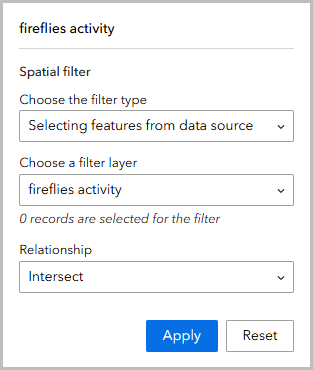
Running the Query widget on intersecting polygon features in ArcGIS Experience Builder returns zero records when a polygon drawn with the Draw widget is used as the spatial filter, as shown in the image below.
Cause
The Query widget in Experience Builder does not fully support dynamic geometries such as polygons drawn directly on the map as spatial filters.
Solution or Workaround
Enable the 'Drawn graphic' option in the Query panel
- In ArcGIS Experience Builder, add the Query widget to the canvas and click the widget to open its configuration panel.
- Enable the 'Drawn graphic' option in the Query panel.
- In the Query panel, on the Content tab, under Query item, click New query.
- In the Set query panel, under Data, click Select data, and select the feature layer.
- Under Spatial filter, click Geometries from a map.
- Under Select a Map widget, click the drop-down menu and click Map.
- Under Geometry types, check the Drawn graphic check box.
- Click Save.
- Draw the desired polygon feature on the canvas and locate the intersecting polygon features using the Query widget.
- On the builder toolbar, click Live view.
- On the canvas, in the Query widget, click the Polygon icon, and draw the polygon feature on the canvas.
- Click Apply.
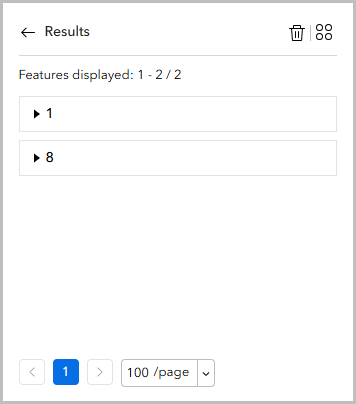
The image below shows the result of the intersecting polygon features in the Query widget.
Find the intersecting polygons using the Near Me widget
- In ArcGIS Experience Builder, add the Near Me widget to the canvas and click the widget to open its configuration panel.
- Configure the proximity to find the intersecting polygons on the Near Me panel.
- In the Near Me panel, on the Content tab, under Analysis Settings, click the map.
- In the map settings panel, under Analysis, click Add Analysis.
- Under Analysis Type, select Proximity and enable Return intersected polygons.
- Click OK > Save.
- Draw the desired polygon feature on the canvas and locate the intersecting polygon features using the Near Me widget.
- On the builder toolbar, click Live view.
- On the canvas, in the Near Me widget, click the Polygon icon and draw the polygon feature to find the intersecting polygon features.
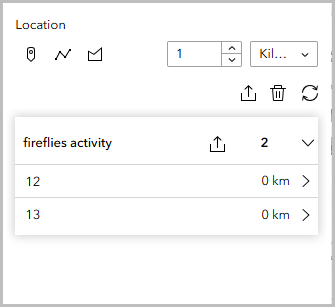
The image below shows the result of the intersecting polygon features in the Near Me widget.
Article ID: 000036812
- ArcGIS Experience Builder
Get support with AI
Resolve your issue quickly with the Esri Support AI Chatbot.


Related Information
Discover more on this topic

Search for related information

Find training related to this topic

Explore ideas and give feedback
Get help from ArcGIS experts
Start chatting now