
操作方法
操作方法:删除 ArcGIS Survey123 网站上的调查记录
描述
删除不必要或者不正确的调查记录是确保数据准确性的重要步骤。 在 ArcGIS Survey123 网站上,调查的所有者或者具有正确权限的数据编辑者可以在调查的“数据”页面上编辑任何调查记录。 本文提供了在 ArcGIS Survey123 网站上删除调查记录的方法。
Note:
This article provides workflows to delete survey records one at a time. Batch deleting survey records is not supported on the ArcGIS Survey123 website. However, it is possible to do so using the Delete Features operation in the ArcGIS REST API to batch delete survey records from the survey's hosted feature layer. Refer to FAQ: Is it possible to batch delete features in ArcGIS Online? and How To: Batch delete features from an ArcGIS Online hosted feature layer for more information.
解决方案或解决方法
可以使用以下方法之一来删除 ArcGIS Survey123 网站上的调查记录:
Note:
Ensure the deleting capability is enabled for the survey to allow data editors to delete survey records from the ArcGIS Survey123 website.
使用“删除此记录”按钮
- 登录到 ArcGIS Survey123 网站。
- 在我的调查选项卡上,从下拉列表中选择我拥有的调查。
- 浏览至调查并单击数据
 。
。 - 在调查的数据页面上,确保启用表单视图,然后从调查表中单击所需调查记录。 随即在右侧显示一个面板。
- 在面板的顶部栏上,单击删除此记录
 以删除调查记录。
使用“在 Map Viewer 中打开”选项
Note:
Ensure editing of the survey’s hosted feature layer is enabled and the Delete option is checked under What kind of editing is allowed? in ArcGIS Online. Refer to ArcGIS Online: Settings that control editing access for instructions.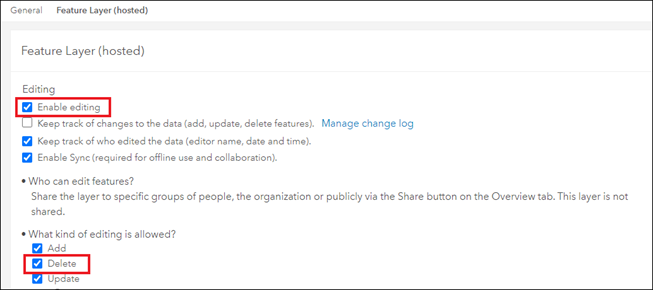
- 登录到 ArcGIS Survey123 网站。
- 在我的调查选项卡上,从下拉列表中选择我拥有的调查。
- 浏览至调查并单击数据 。
- 在调查的数据页面上,单击顶部面板上的在 Map Viewer 中打开。
- 在 Map Viewer 窗口中,单击地图上的调查记录以显示其弹出窗口。
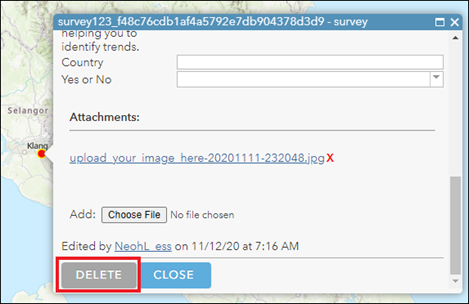
- 单击编辑 > 删除。
文章 ID: 000028758
获得人工智能支持
使用 Esri Support AI Chatbot 快速解决您的问题。


相关信息
发现关于本主题的更多内容

Search for related information

Find training related to this topic

Explore ideas and give feedback
获取来自 ArcGIS 专家的帮助
立即开始聊天