
Instrução
Excluir registros de pesquisa no site ArcGIS Survey123
Descrição
A exclusão de registros de pesquisa desnecessários ou incorretos é uma etapa fundamental para garantir a precisão dos dados. O proprietário da pesquisa ou editores de dados com os privilégios corretos pode editar quaisquer registros de pesquisa na página Dados da pesquisa no site da web ArcGIS Survey123. Este artigo fornece os métodos para excluir registros de pesquisa no site da web ArcGIS Survey123.
Note:
This article provides workflows to delete survey records one at a time. Batch deleting survey records is not supported on the ArcGIS Survey123 website. However, it is possible to do so using the Delete Features operation in the ArcGIS REST API to batch delete survey records from the survey's hosted feature layer. Refer to FAQ: Is it possible to batch delete features in ArcGIS Online? and How To: Batch delete features from an ArcGIS Online hosted feature layer for more information.
Solução ou Solução Provisória
Utilize um dos seguintes métodos para excluir registros de pesquisa no site da web ArcGIS Survey123.
Note:
Ensure the deleting capability is enabled for the survey to allow data editors to delete survey records from the ArcGIS Survey123 website.
Usar o botão Excluir este registro
- Entre no site ArcGIS Survey123.
- Na guia Minhas Pesquisas, selecione Pesquisas de minha propriedade na lista suspensa.
- Procure a pesquisa e clique em Dados
 .
. - Na página Dados da pesquisa, certifique-se de que Visualização de formulário esteja habilitada, e clique no registro de pesquisa desejado na tabela de pesquisa. Um painel é exibido à direita.
- Na barra superior do painel, clique em Excluir este registro
 para excluir o registro da pesquisa.
Utilizar a opção Abrir no Map Viewer
Note:
Ensure editing of the survey’s hosted feature layer is enabled and the Delete option is checked under What kind of editing is allowed? in ArcGIS Online. Refer to ArcGIS Online: Settings that control editing access for instructions.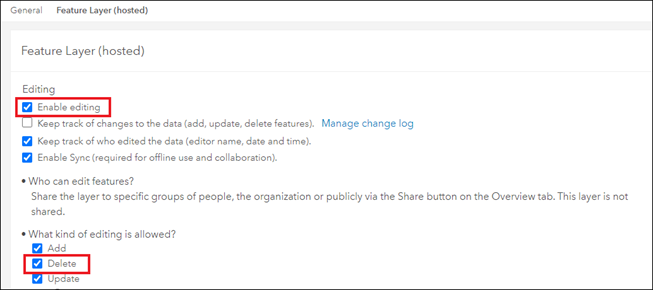
- Entre no site ArcGIS Survey123.
- Na guia Minhas Pesquisas, selecione Pesquisas de minha propriedade na lista suspensa.
- Procure a pesquisa e clique em Dados .
- Na página Dados da pesquisa, no painel superior, clique em Abrir no Map Viewer.
- Na janela Map Viewer, clique no registro da pesquisa no mapa para exibir seu pop-up.
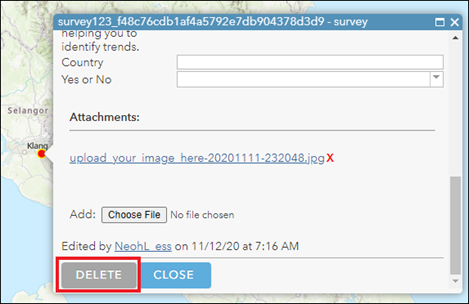
- Clique em Editar > Excluir.
ID do Artigo: 000028758
Obtenha suporte com IA
Resolva seu problema rapidamente com o chatbot de IA de suporte da Esri.


Informações Relacionadas
Descubra mais sobre este tema

Search for related information

Find training related to this topic

Explore ideas and give feedback
Obtenha ajuda de especialistas do ArcGIS
Comece a conversar agora