
CÓMO
Eliminar registros de encuesta en el sitio web de ArcGIS Survey123
Descripción
Eliminar registros de encuestas innecesarios o incorrectos es un paso esencial para garantizar la precisión de los datos. El propietario de la encuesta o los editores de datos con los privilegios correctos pueden editar cualquier registro de encuesta en la página Datos de la encuesta en el sitio web de ArcGIS Survey123. En este artículo se proporcionan los métodos para eliminar registros de encuesta en el sitio web de ArcGIS Survey123.
Note:
This article provides workflows to delete survey records one at a time. Batch deleting survey records is not supported on the ArcGIS Survey123 website. However, it is possible to do so using the Delete Features operation in the ArcGIS REST API to batch delete survey records from the survey's hosted feature layer. Refer to FAQ: Is it possible to batch delete features in ArcGIS Online? and How To: Batch delete features from an ArcGIS Online hosted feature layer for more information.
Solución o solución alternativa
Utilice uno de los siguientes métodos para eliminar registros de encuesta en el sitio web de ArcGIS Survey123.
Note:
Ensure the deleting capability is enabled for the survey to allow data editors to delete survey records from the ArcGIS Survey123 website.
Utilizar el botón Eliminar este registro
- Inicie sesión en el sitio web de ArcGIS Survey123.
- En la pestaña Mis encuestas, seleccione Encuestas de mi propiedad en la lista desplegable.
- Vaya a la encuesta y haga clic en Datos
 .
. - En la página Datos de la encuesta, asegúrese de que la vista Formulario esté habilitada y haga clic en el registro de encuesta deseado de la tabla de encuestas. Aparece un panel a la derecha.
- En la barra superior del panel, haga clic en Eliminar este registro
 para eliminar el registro de la encuesta.
Utilizar la opción Abrir en Map Viewer
Note:
Ensure editing of the survey’s hosted feature layer is enabled and the Delete option is checked under What kind of editing is allowed? in ArcGIS Online. Refer to ArcGIS Online: Settings that control editing access for instructions.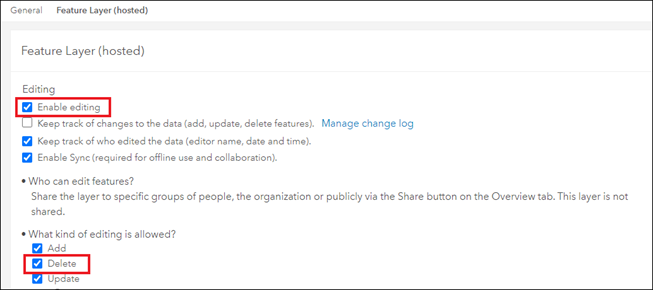
- Inicie sesión en el sitio web de ArcGIS Survey123.
- En la pestaña Mis encuestas, seleccione Encuestas de mi propiedad en la lista desplegable.
- Vaya a la encuesta y haga clic en Datos .
- En la página Datos de la encuesta, en el panel superior, haga clic en Abrir en Map Viewer.
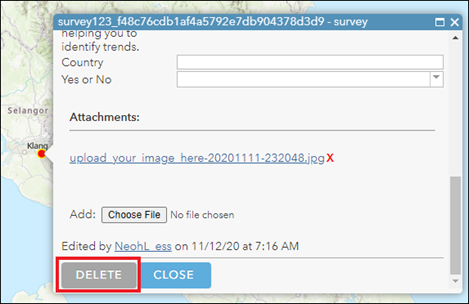
- En la ventana de Map Viewer, haga clic en el registro de la encuesta en el mapa para mostrar su ventana emergente.
- Haga clic en Editar > Eliminar.
Id. de artículo: 000028758
Obtenga soporte con IA
Resuelva su problema rápidamente con el chatbot de inteligencia artificial de soporte de Esri.


Información relacionada
Descubrir más sobre este tema

Search for related information

Find training related to this topic

Explore ideas and give feedback
Obtener ayuda de expertos en ArcGIS
Empieza a chatear ahora