
PROBLEM
Unable to select multiple features using the Shift key in the ArcGIS Experience Builder Select widget
Description
In ArcGIS Experience Builder, using the Select widget with the Shift key to select multiple features on a Map widget results in only the last clicked feature being selected.
Cause
This is expected behavior. When 'Attribute selection' is enabled in the Select widget's settings, the widget switches to an attribute-query workflow and limits interactive map selection to 'New selection' only. Refer to ArcGIS Experience Builder: Usage notes for more information.
Solution or Workaround
Disable 'Attribute selection'
- Open the ArcGIS Experience Builder web experience.
- Click the Select widget to open the Select pane.
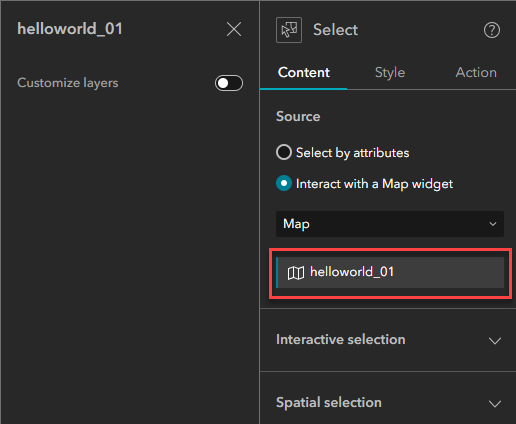
- In the Select pane, on the Content tab, click the map to open the Customize layers panel. In this example, the helloworld_01 map is selected.
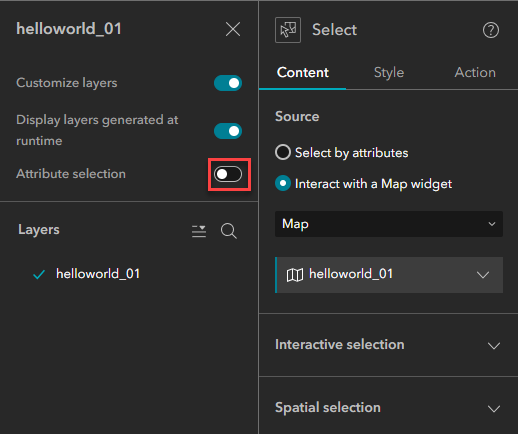
- In the Customize layers panel, navigate and disable the Attribute selection setting.
The image below shows multiple features selected using the Shift key in ArcGIS Experience Builder after disabling the 'Attribute selection' setting.
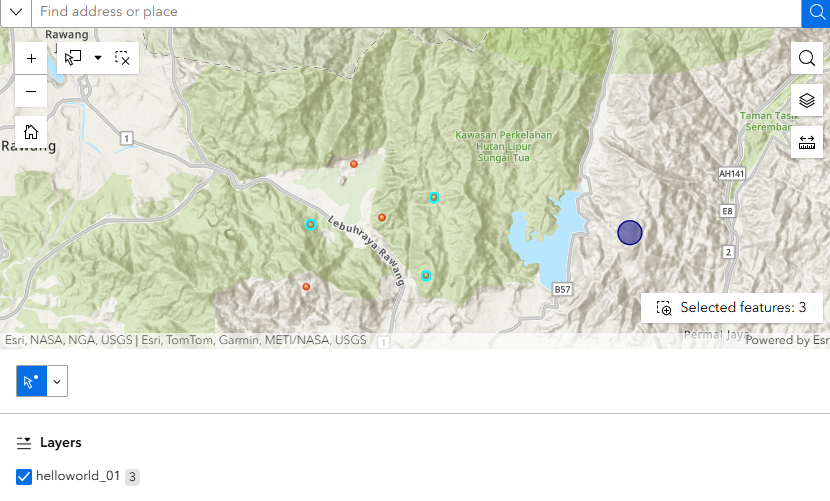
Use the Select tool
Optionally, use the Select tool from the Map widget in the ArcGIS Experience Builder web experience. Refer to How To: Select multiple features within the map in ArcGIS Experience Builder for instructions.
Article ID: 000035827
- ArcGIS Experience Builder
Get support with AI
Resolve your issue quickly with the Esri Support AI Chatbot.


Related Information
Discover more on this topic

Search for related information

Find training related to this topic

Explore ideas and give feedback
Get help from ArcGIS experts
Start chatting now