
PROBLEM
Symbol size mismatch between the Legend widget and map in ArcGIS Experience Builder
Description
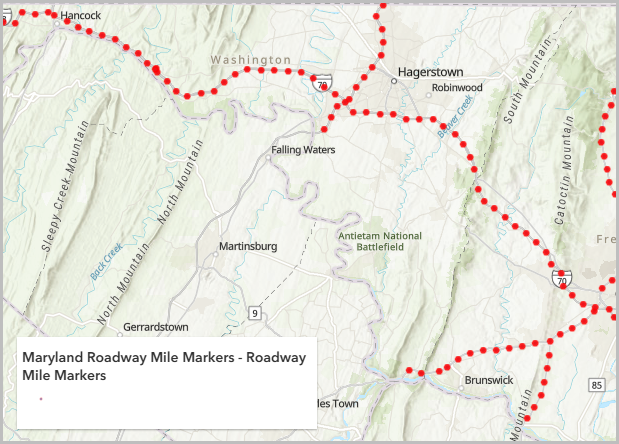
When a web map containing point symbols from ArcGIS Online is added to ArcGIS Experience Builder, the symbols appear smaller in the Legend widget than on the map.
The image below shows the point symbol in the Legend widget appearing smaller than on the map.
Cause
The Legend widget in ArcGIS Experience Builder displays symbols based on the saved web map symbology, rather than symbols dynamically rendered on the map. As a result, if the symbol sizes in the web map differ from those displayed due to layer styling or map extent changes, the legend does not automatically update to reflect the changes.
Solution or Workaround
To resolve the issue, disable the 'Adjust size automatically' option and configure the symbol size in ArcGIS Online Map Viewer.
- In ArcGIS Online Map Viewer, open the web map with the feature layer. Refer to ArcGIS Online: View maps (Map Viewer) for instructions.
- Disable the 'Adjust size automatically' option for the point symbol in the Symbol style pane.
- In Map Viewer, on the Contents (dark) toolbar, browse to and click the layer.
- On the Settings (light) toolbar, click Styles.
- In the Styles pane, under Pick a style section, navigate to the style applied to the layer, and click Style options. In this example, Location (single symbol) is applied to the layer.
- In the Styles options pane, under Symbol style, click the symbology icon. The Symbol style pane opens.
- In the Symbol style pane, under Current symbol, uncheck the Adjust size automatically check box.
- Click Done.
- Configure the size of the point symbol. Refer to ArcGIS Online: Change symbol style for instructions.
Note:
Optionally, re-check Adjust size automatically. However, leaving it unchecked ensures the symbol size remains consistent between the map and the Legend widget in ArcGIS Experience Builder.
- Save the web map to reflect the changes in ArcGIS Experience Builder. Refer to ArcGIS Online: Save maps (Map Viewer) for more information.
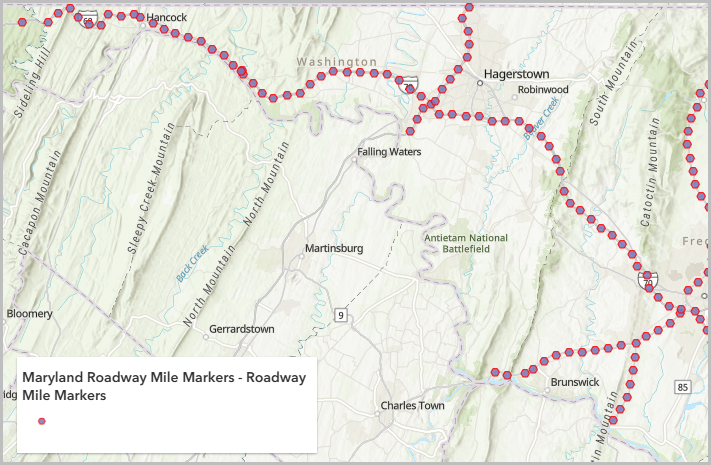
The image below shows the point symbol on the Legend widget appearing the same as on the map in ArcGIS Experience Builder.
Article ID: 000036136
- ArcGIS Online
- ArcGIS Experience Builder
Get support with AI
Resolve your issue quickly with the Esri Support AI Chatbot.


Related Information
Discover more on this topic

Search for related information

Find training related to this topic

Explore ideas and give feedback
Get help from ArcGIS experts
Start chatting now