
PROBLEM
Unable to check the 'Adjust width automatically' check box in ArcGIS Online Map Viewer
Description
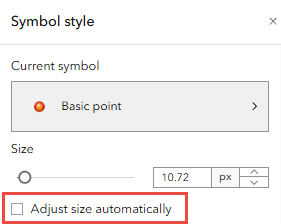
In ArcGIS Online, the 'Adjust width automatically' check box in the Styles pane is used to adjust the size of the symbology. However, in some cases, the 'Adjust width automatically' check box does not remain checked after the settings are saved and reopened, as shown in the image below.
Cause
This is by design. The absence of populated fields in the web map prevents calculation of column widths and causes the 'Adjust width automatically' setting to revert.
Solution or Workaround
To solve this issue, populate at least one field in the hosted feature layer with valid data to enable calculation of appropriate column widths and prevent the 'Adjust width automatically' setting from reverting after it is saved.
Article ID: 000037400
- ArcGIS Online
Get support with AI
Resolve your issue quickly with the Esri Support AI Chatbot.


Related Information
Discover more on this topic

Search for related information

Find training related to this topic

Explore ideas and give feedback
Get help from ArcGIS experts
Start chatting now