
PROBLEM
Labels are not displayed when overlapped with graphics in ArcGIS Pro
Description
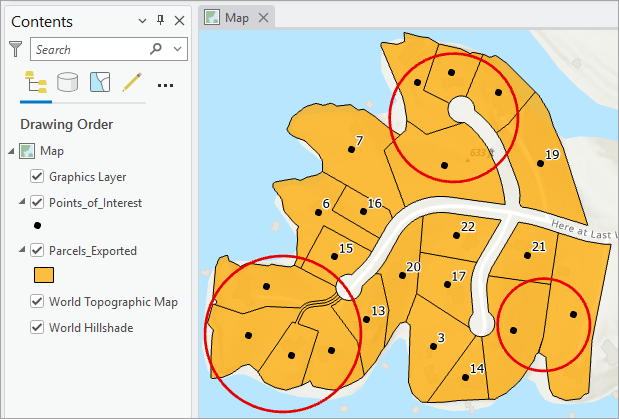
In ArcGIS Pro, labels are not displayed when overlapped with graphics from a graphics layer. The image below shows the graphics symbolized as red-outlined circles, obscuring the underlying labels and reducing map readability.
Cause
This is expected behavior. In ArcGIS Pro, graphics layers are assigned with high feature weight by default to prevent labels from being placed over graphic elements. As a result, labels underneath are not displayed when they are overlapped with graphics in the map view. Refer to ArcGIS Pro: Weight labels and features for more information.
Solution or Workaround
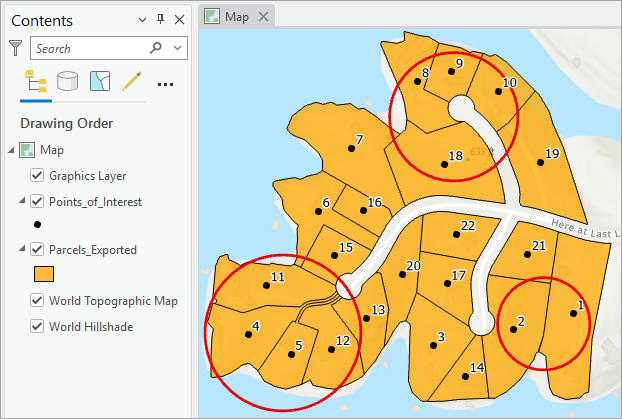
To ensure the labels are displayed when overlapped with graphics, set the lowest feature weight to the graphic layer.
- Open the ArcGIS Pro project.
- In the Contents pane, right-click the feature layer and select Label. Click the Labeling tab.
- In the Map group, click More > Weights.
- Configure the graphic layer feature weight.
- In the Label Weight Ranking dialog box, click the Graphic Layers tab.
- Click the Barrier Weight cell of the desired graphic layer row.
- On the selected cell, click the drop-down arrow and select Low or None from the drop-down list.
- Click Apply to apply the changes.
- Click OK to close the dialog box.
The image below shows the overlapped labels are displayed in the map view.
Article ID: 000037283
- ArcGIS Pro
Get support with AI
Resolve your issue quickly with the Esri Support AI Chatbot.


Related Information
Discover more on this topic

Search for related information

Find training related to this topic

Explore ideas and give feedback
Get help from ArcGIS experts
Start chatting now