
PROBLEM
Inconsistent point symbol sizes in list and map elements in ArcGIS Dashboards
Description
In ArcGIS Dashboards, point symbols in the list element are not displayed at a uniform size and the sizes differ from the same symbols in the map element, even though uniform sizes are set in the web map.
The list and map elements below display the symbol size inconsistency on a dashboard.
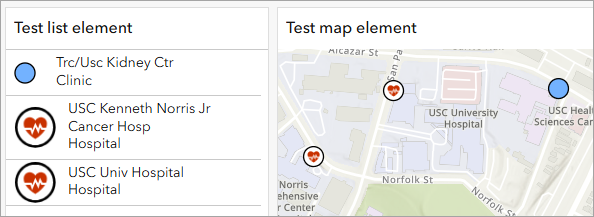
Cause
This issue occurs because features symbolized with the Vector Symbols category are optimized for clarity and detail. By design, Vector Symbols scale slightly larger than Classic Symbols to ensure fine details remain visible across different map scales. While this behavior works as intended in maps, it results in visual inconsistency when the same symbols are rendered in ArcGIS Dashboards list elements, where the uniform size settings are not honored.
Solution or Workaround
To display consistent point symbol sizes in the list map elements, use the Classic Symbols category. Refer to the following workflow for instructions.
Note:
This workaround modifies the original symbol designs.
- Sign in to ArcGIS Online.
- Open the web map used in the dashboard in ArcGIS Online Map Viewer. Refer to ArcGIS Online: Find and open a map for instructions.
- Update the style category used for the point features in the web map.
- Open the Style options pane. Refer to Step 1 and Step 2 in ArcGIS Online: Change symbol style for instructions.
- In the Style options pane, under TYPE, click the preferred symbol class.
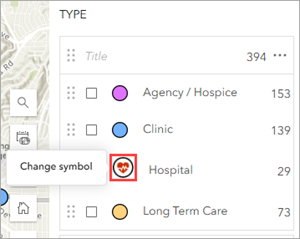
- In the Symbol style pane, click the symbol under Current symbol.
- Click the Category drop-down arrow and select any of the options listed under the Classic Symbols category.
Note:
The listed categories depend on the type of features and the selected smart mapping styles. Refer to ArcGIS Online: Styles quick reference for more information.
- Select the preferred symbol from the symbol gallery.
- Click Done and customize the symbol properties if necessary. In this example, the Size property is set to match the other existing symbol classes.
- In the Style options pane, click Done.
- In the Styles pane, click Done.
- On the Contents (dark) toolbar, click Save and open
 , and click Save
  to save the changes in the web map.
 - In ArcGIS Dashboards, refresh the dashboard view page to reflect the changes.
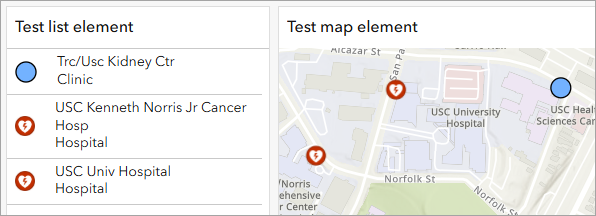
The point symbols display at a consistent size in the list element and match the sizes of the same symbols in the map element in ArcGIS Dashboards.
Article ID: 000037724
- ArcGIS Online
- ArcGIS Dashboards
Get support with AI
Resolve your issue quickly with the Esri Support AI Chatbot.


Related Information
Discover more on this topic

Search for related information

Find training related to this topic

Explore ideas and give feedback
Get help from ArcGIS experts
Start chatting now