
PROBLEM
Heading text blocks are not displayed on the navigation bars in ArcGIS StoryMaps
Description
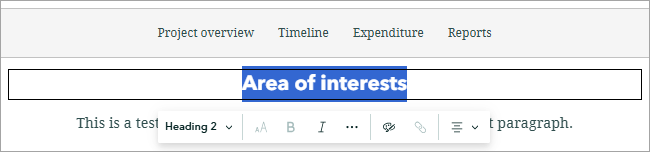
In ArcGIS StoryMaps, heading text blocks are not displayed on the navigation bar, which causes an incomplete navigation structure for the story. The image below shows the issue, where the highlighted heading text block is not displayed on the navigation bar.
Cause
This issue is by design. Only top-level headings are treated as bookmarks that appear in the navigation bar. Refer to ArcGIS Blog: Create a standout story with the ArcGIS StoryMaps design panel for more information.
Solution or Workaround
- Open the story on the story map's edit page.
- Change the heading text type.
- Highlight the desired heading text block.
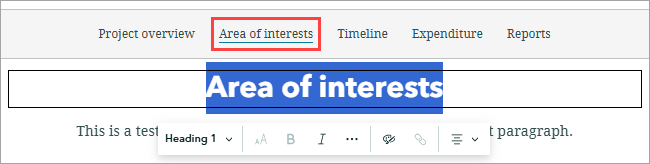
- On the text editing toolbar, click the text type drop-down list and select Heading 1.
The highlighted heading text block is displayed on the navigation bar.
Article ID: 000039292
- ArcGIS StoryMaps
Get support with AI
Resolve your issue quickly with the Esri Support AI Chatbot.


Related Information
Discover more on this topic

Search for related information

Find training related to this topic

Explore ideas and give feedback
Get help from ArcGIS experts
Start chatting now