
ERROR
ArcGIS Pro requires Microsoft Edge WebView2 Runtime (x64)
Error Message
After installing or upgrading ArcGIS Pro (versions 3.3.x to 3.4), launching the application returns the following error message:
Error:
ArcGIS Pro requires Microsoft Edge WebView2 Runtime (x64). To download and install Microsoft Edge WebView2, visit the Microsoft website or contact your system administrator.
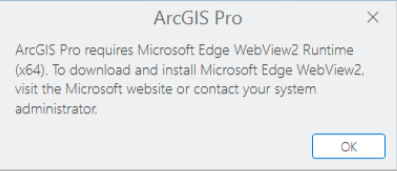
This error is observed in:
- Virtual Desktop Infrastructure (VDI) environments.
- Environments with third-party applications such as Adobe Acrobat are managed using WebView2 Runtime versions.
Cause
ArcGIS Pro requires a valid Microsoft Edge WebView2 Runtime (x64). The error may occur when:
- The VDI user profile is corrupted, preventing ArcGIS Pro from detecting WebView2 Runtime.
- The WebView2 Runtime installer version used (x86 instead of x64) is incorrect.
- The WebView2 Runtime is installed per-user without administrative privileges, preventing ArcGIS Pro from detecting it.
- A third-party application, such as Adobe Acrobat installs or manages a different version of WebView2 Runtime, causing a version conflict.
Solution or Workaround
Clear the user profile on the VDI
Warning:
The instructions below include making changes to essential parts of your operating system. It is recommended to backup the operating system and files, including the Registry, before proceeding. Consult with a qualified computer systems professional, if necessary.
Esri cannot guarantee results from incorrect modifications while following these instructions; therefore, use caution and proceed at your own risk.
- Close all ArcGIS applications.
- Navigate to the profile folder in the following file path.
C:\Users\<Username>\
- Rename the folder to <Username_old>.
- Open the Windows Start Menu.
- In the search bar, type regedit and press Enter. If prompted, click Yes in the User Account Control window.
- In the Registry Editor window, expand the HKEY_LOCAL_MACHINE > Software > Microsoft > Windows NT > CurrentVersion > ProfileList folders.
- Navigate to the SID key where the ProfileImagePath value points to C:\Users\<username>, right-click the key and click Delete.
- Restart the VDI host.
When the user logs in to the VDI, Windows automatically creates a new, clean user profile folder.
Install the correct version of Microsoft Edge WebView2 Runtime
For environments with version conflicts, ensure the Microsoft Edge WebView2 Evergreen Runtime (x64) is installed and active on the machine. Refer to ArcGIS Blog: ArcGIS Pro 3.3 Requires WebView2 Runtime (and you probably already have it) for more information. The WebView2 Evergreen Runtime version 136 and later have been verified to work with ArcGIS Pro 3.3.3 alongside Adobe Acrobat on the same system. Refer to Problem: ArcGIS Pro, AllSource, Drone2Map and RealityStudio require the Microsoft Edge WebView2 Runtime for instructions to install the correct version of Microsoft Edge WebView2 Runtime.
Article ID: 000034368
- ArcGIS Pro 3 3
- ArcGIS Pro 3 4
Get support with AI
Resolve your issue quickly with the Esri Support AI Chatbot.


Related Information
Discover more on this topic

Search for related information

Find training related to this topic

Explore ideas and give feedback
Get help from ArcGIS experts
Start chatting now