
操作方法
操作方法:升级企业级地理数据库后审核分支恢复版本
摘要
已标识可能导致分支版本系统表不一致的工作流。 当遇到此类问题时,缺失分支版本化元数据的要素可能会在协调、提交和/或删除版本时导致数据不一致。
问题源于在保存编辑内容、协调和提交过程中维护分支版本化元数据的方式。 在这些操作过程中,可能会从地理数据库中移除分支版本化元数据。 当错误移除分支版本化元数据后,要素可能无法正确参与未来的操作,例如协调、提交和删除版本,从而导致数据不一致。 该问题发生在竞争条件下,相互冲突的请求导致错误地移除有效要素的分支版本化元数据。
针对错误分支版本化元数据执行的操作可能导致:
- 分支版本化数据引用了已删除的版本,并且,
- 分支版本化数据引用了共同祖先时刻之前的时刻。
以下版本中可避免并修复这些系统表不一致:
- ArcGIS Pro 3.3 及更高版本
- ArcGIS Pro 3.2.4
- ArcGIS Pro 3.1.7
- ArcGIS Pro 2.9.13,以及
- ArcGIS Server Branch Versioning Data Consistency Patch
升级企业级地理数据库还将检查是否存在与分支版本化数据相关的任何数据不一致。 在升级过程中,将通过创建具有已修复数据的新版本或者更新现有版本来解决不一致。 应审查这些版本,以确定是否应将这些版本中的任何数据提交到默认版本。
本文介绍了在地理数据库升级后,审核已解决的不一致问题的工作流。 如上所述,升级可以通过两种方式来修复数据:创建新的恢复版本或者更新现有版本。 考虑到本文的目的,这些版本分别称为新的恢复版本和具有已恢复行的现有版本。 本文所审核的地理数据库具有两个版本,将对其进行访问和审核。 这些版本的名称如下:
- RECOVERY_VERSION_BR_1(新的恢复版本)
- EXISTING_VERSION(具有已恢复行的现有版本)
提供的工作流展示了可以采集有关这些版本的信息的位置,连接到这些版本的方式,以及可能需要在 ArcGIS Pro 中针对这些版本执行的操作。
以下为该工作流的概述:
- 已使用“升级地理数据库”工具或 arcpy.UpgradeGDB_management 函数,并报告了一条警告信息:
WARNING 003929: During the upgrade recovery versions (<value>) were created that require further review. Review <value> for more detail.
- 审核 sde_setup.log 中的版本列表。
- 准备版本以供访问:
- 更新内部系统分支表以包含服务名称。
- 确保您的 ArcGIS Enterprise 门户中存在相应要素服务,该要素服务具有包含版本编辑内容的数据集。
- 使用“差异”视图。
- 编辑/协调/提交。
- 删除版本。
过程
审核“升级地理数据库”工具的结果和 sde_setup.log
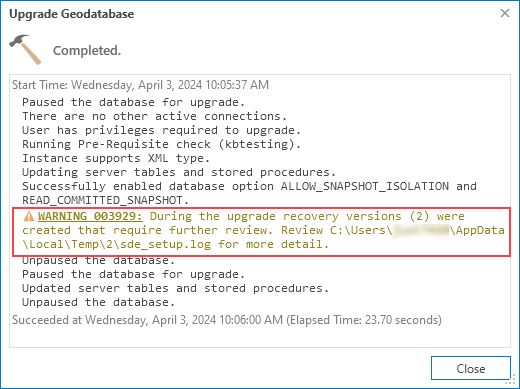
如果在升级过程中检测到不一致,则“升级地理数据库”工具将返回一条警告,其中说明了已恢复的版本数量以及 sde_setup.log 文件的位置,如下图所示。 有关地理数据库升级的消息会写入 sde_setup.log 文件,将在运行此工具的相应计算机上为 %TEMP% 变量所指定的目录中创建该文件。 版本数量既包括新的恢复版本,也包括具有已恢复行的现有版本。 sde_setup.log 文件包含有关已修复版本的附加信息。
Note:
If using Python to upgrade the geodatabase, use the following example to ensure that warnings are properly returned to report recovery versions. If no warning is returned, no data inconsistencies were found in the geodatabase and no further action is required.
import arcpy

arcpy.UpgradeGDB_management(
    input_workspace=r"C:\temp\sysadmin_connection.sde",
    input_prerequisite_check="PREREQUISITE_CHECK",
    input_upgradegdb_check="UPGRADE"
    )

warnings = arcpy.GetMessages(1)
errors = arcpy.GetMessages(2)

if "WARNING 003929" in warnings:
    print(warnings)
elif "Recovery versions" in warnings:
    recovery_versions = warnings[warnings.find("Recovery versions"):warnings.find(")") + 1]

    for item in warnings.split("\n"):
        if "sde_setup.log" in item:
            logfile_loc = item.strip()

    print("--------------------------------------------------------------------------------------------------")
    print(f"WARNING 003929: During the upgrade {recovery_versions} were created that require further review.")
    print(f"Review {logfile_loc} for more detail.")
    print("--------------------------------------------------------------------------------------------------")
if errors:
    print(errors)
如有必要,请下载示例 sde_setup_howto.log 文件并使用文本编辑器将其打开;将在以下步骤中引用此文件的部分内容。
- 在计算机上打开 sde_setup.log 文件。
- 审核 sde_setup.log 文件中新的恢复版本以及具有已恢复行的现有版本:
- 在 sde_setup.log 文件中搜索 Created recovery version(s) 部分。
- sde_setup.log 文件将列出新创建的版本,命名规则为“sde.RECOVERY_VERSION_BR_<branch_id>”,也称为新的恢复版本。 将显示在日志文件的以下部分中:
[08:51:34.091] ==================================================================
[08:51:34.091] Begin recovery of branch versioned data associated with a missing branch...
[08:51:37.302] Created recovery version(s):
[08:51:37.302] sde.RECOVERY_VERSION_BR_1 with edits to:
[08:51:37.302]     - CREATOR1.POINT
[08:51:37.302]     - CREATOR1.LINE
[08:51:37.302]     - CREATOR1.POLYGON
[08:51:37.302] Completed recovery of branch versioned data associated with a missing branch.
[08:51:37.302] An administrator must update the service_name for the above versions in the sde.SDE_branches table in order for users to connect and review.
[08:51:37.303] ==================================================================
- 请注意在相应版本中具有已恢复数据的数据集,因为将在本文的最后步骤中查看这些版本中的编辑内容。
- 在 sde_setup.log 文件中搜索 Recovered rows in version(s) 部分。 将显示在以下部分中:
[08:51:37.304] Begin recovery of branch versioned data associated with an invalid common ancestor moment...
[08:51:37.622] Recovered rows in version(s):
[08:51:37.622] ADMIN.EXISTING_VERSION (service: Post_DataLoss) with edits to:
[08:51:37.622]     - CREATOR1.POINT
                           Object ID(s) : {46,436}
[08:51:37.622]     - CREATOR1.POLYGON
                           Object ID(s) : {462}
[08:51:37.622] Completed recovery of branch versioned data associated with an invalid common ancestor moment.
[08:51:37.622] A portal user must connect and review the above version(s).
- sde_setup 日志文件将列出已更新的现有版本,也称为具有已恢复行的现有版本。
- 请注意在相应版本中具有已恢复数据的每个数据集的对象 ID,因为将在本文的后续步骤中查看这些特定对象 ID。
准备恢复版本
在审核恢复版本之前,需要完成多个步骤。 以下部分介绍了准备新的恢复版本和具有已恢复行的现有版本以供进行访问和审核的过程。
要使用 RECOVERY_VERSION_BR_<branch_id> 命名规范准备每个新的恢复版本:
- 审核 sde_setup.log 文件并检查相应版本的数据集列表。
- 确保 ArcGIS Enterprise 门户中存在一个服务,该服务具有 sde_setup.log 文件中列出的相应数据集。
Note:
If a service does not exist in your portal with these datasets referenced, a new service must be published. Add these distinct datasets to a new map as the dataset owner, and publish a web feature layer with the version management capability enabled (Share branch versioned data).
- 在相应的数据库管理软件解决方案中,针对每个 RECOVERY_VERSION_BR_<branch_id> 版本,通过结构化查询语言 (SQL),使用在上一步中确定的相应服务名称更新 SDE_branches(或 branches)系统表。
请使用以下示例,替换 sde_setup.log 文件中的结果:
UPDATE sde.sde_branches
SET service_name = 'my_service_name'
WHERE name = 'RECOVERY_VERSION_BR_1';
- 要准备具有已恢复行的每个现有版本:
- 审核 sde_setup.log 并检查相应版本的 (Service : <service_name>)。
- 确保该服务仍然存在于 ArcGIS Enterprise 门户中,并且具有 sde_setup.log 文件中列出的相应数据集。
Note:
If a service does not exist in your portal with these datasets referenced, a new service must be published. Add these distinct datasets to a new map as the dataset owner, and publish a web feature layer with the version management capability enabled (Share branch versioned data), using the same service name.
访问并审核恢复版本
这些版本现已准备就绪,可供查看已修复的数据。
- 从包含新的恢复版本和/或具有已恢复行的现有版本的服务中,将 web 要素图层添加至 ArcGIS Pro 中的新地图。
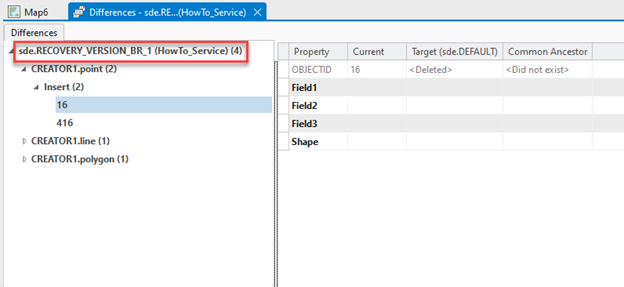
- 切换至该版本并打开差异视图,如下图所示:
- 如果已连接版本为新的恢复版本,则所有差异均为已修复的编辑内容,需要按照本文后续步骤(步骤 3 和 4)中的说明对其进行审核
- 如果已连接版本为具有已恢复行的现有版本,则其可能包含引用现有编辑内容中的对象 ID 的差异,以及引用升级过程中恢复的 sde_setup.log 文件中的对象 ID 的差异。 虽然应该审核所有差异,但升级过程中恢复的差异仍需按照本文后续步骤(步骤 3 和 4)中的说明进行审核
Note:
If a new recovery version only has edits to dataset system tables, for example: only Utility Network system tables, the Differences view may not display changes; therefore, the version can be deleted.
- 审核并检查编辑内容。
- 审核用户属性和系统维护的属性,例如编辑者追踪属性。
- 对于任何形状列差异,审核“更改显示”。
- 根据以上步骤 3 中的审核,确定是否保留编辑内容。
- 要保留编辑内容,请协调该版本并将其提交到默认版本。
- 如果仅需部分编辑内容,请在协调/提交操作前进行相应编辑。
- 要放弃编辑内容:
- 对于新的恢复版本,可以删除该版本。
- 对于具有已恢复行的现有版本,请编辑关联的对象 ID 以具有与默认制图表达相同的属性和形状。 否则,可以删除该版本,并且可以在另一个版本中重新完成修复前的工作。
- 要保留编辑内容,请协调该版本并将其提交到默认版本。
文章 ID: 000032501
获得人工智能支持
使用 Esri Support AI Chatbot 快速解决您的问题。


相关信息
发现关于本主题的更多内容

Search for related information

Find training related to this topic

Explore ideas and give feedback
获取来自 ArcGIS 专家的帮助
立即开始聊天