
问题
问题:无法在 ArcGIS Pro 中克隆 Python 环境。 WinError 206 文件名或扩展名过长
描述
在 ArcGIS Pro 中,尝试克隆 Python 环境失败并返回以下错误:
Error:
InvalidArchiveError("Error with archive C:\\Users\\<username>\\AppData\\Local\\ESRI\\conda\\pkgs\\tensorflow-base-2.7.0-py39_cuda11.1_cudnn8.1_6.tar.bz2. You probably need to delete and re-download or re-create this file. Message was:\n\nfailed with error: [WinError 206] The filename or extension is too long: 'C:\\\\Users\\\\<username>\\\\AppData\\\\Local\\\\ESRI\\\\conda\\\\pkgs\\\\tensorflow-base-2.7.0-py39_cuda11.1_cudnn8.1_6\\\\Lib\\\\site-packages\\\\tensorflow\\\\include\\\\external\\\\cudnn_frontend_archive\\\\_virtual_includes\\\\cudnn_frontend\\\\third_party\\\\cudnn_frontend\\\\include\\\\contrib\\\\nlohmann\\\\json'")

原因
- 新 Python 环境克隆目录的路径长度或文件名过长。
- 现有 Conda 包损坏。
解决方案或解决方法
根据问题原因,可以采用以下提供的解决方法。
调整文件名长度
确保文件名和路径不超过 Windows 允许的最大长度,即 260 个字符。 有关详细信息,请参阅 Microsoft Learn:最大路径长度限制。
清理 Conda 文件和包,并在 Windows 注册表中启用长路径属性
Warning:
The instructions below include making changes to essential parts of the operating system. Esri recommends performing a backup of the operating system and files, including the registry, before proceeding.

Esri cannot guarantee results from incorrect modifications while following these instructions. Exercise caution. Consult a qualified computer systems professional if necessary.
- 在任务栏上的 Windows 搜索框中,搜索并右键单击 Python 命令提示符,然后选择以管理员身份运行。
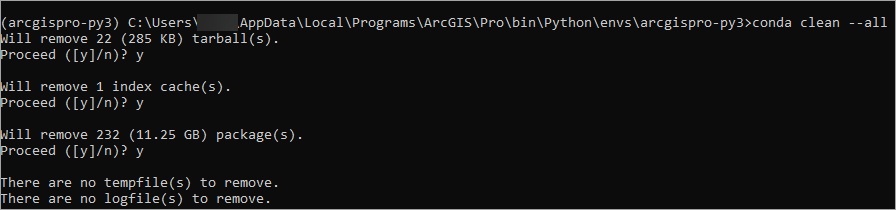
- 输入以下命令以移除索引缓存、锁定文件、未使用的缓存包、tarball 和日志文件。
conda clean –-all
- 键入 y 以确认后续提示。
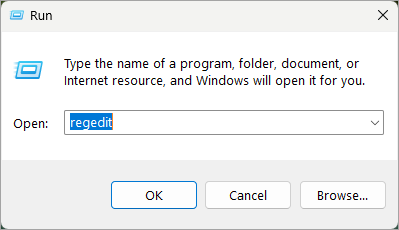
- 在任务栏上的 Windows 搜索框中,搜索并单击运行。
- 键入 regedit,然后单击确定以打开注册表编辑器窗口。
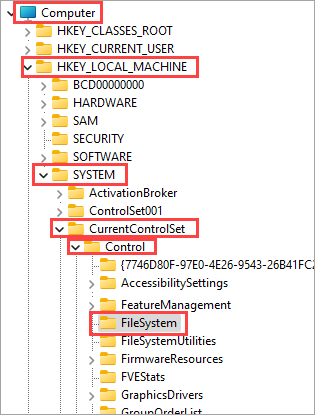
- 在注册表编辑器窗口中,导航至 Computer > HKEY_LOCAL_MACHINE > SYSTEM > CurrentControlSet > Control > FileSystem。
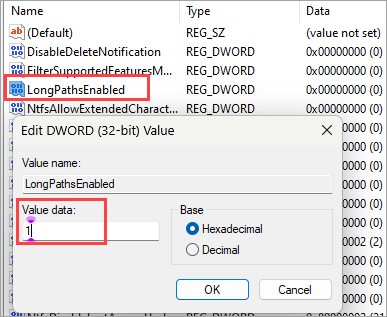
- 双击 LongPathsEnabled 以将值数据参数由 0 设置为 1。 单击确定。
- 在启动 ArcGIS Pro 之前,请重新启动计算机,以便通过 ArcGIS Pro 中的包管理器或 Python 命令提示符克隆新的 Python 环境。
Note:
Alternatively, perform a clean uninstall and reinstall of ArcGIS Pro before cloning a new Python environment.
文章 ID: 000032633
获得人工智能支持
使用 Esri Support AI Chatbot 快速解决您的问题。


相关信息
发现关于本主题的更多内容

Search for related information

Find training related to this topic

Explore ideas and give feedback
获取来自 ArcGIS 专家的帮助
立即开始聊天