
操作方法
操作方法:在 ArcGIS Pro 中确定重叠多面体图层可见性
摘要
多面体图层的可见性对于城市规划与设计、信号覆盖和监控非常有用。 在许多情况下,一个多面体图层(建筑物或塔楼)位于另一个多面体图层(屋顶或太阳能电池板)的下方。 因此,在确定目标要素的可见性之前,合并这些图层以仅创建一个目标要素至关重要。 本文概述了在 ArcGIS Pro 中确定多面体图层可见性的工作流。
过程
Note:
This workflow requires the ArcGIS Pro Advanced license. Refer to ArcGIS Pro: ArcGIS Pro license levels for more information.
- 打开包含多面体图层和观测点图层的 ArcGIS Pro 工程。
- 使用合并工具合并重叠的多面体图层以创建单个多面体图层。 有关查找并使用地理处理工具的说明,请参阅 ArcGIS Pro:查找地理处理工具。
- 使用多面体覆盖区工具根据已合并多面体图层创建面覆盖区。
- 使用插值 Shape 工具,根据表面数据插值 z 值以创建 3D 要素。 对于输入表面,确保所使用的表面数据包含高程值(z 值)。
Note:
Elevation can be edited on a single plane with the z-values field in the attribute table or by vertex if the output geometry attributes are irrelevant. Refer to ArcGIS Pro: Edit vertex z-values for more information.
Note:
Alternatively, use the Intervisibility tool to determine the visibility of the sight lines using potential observations.
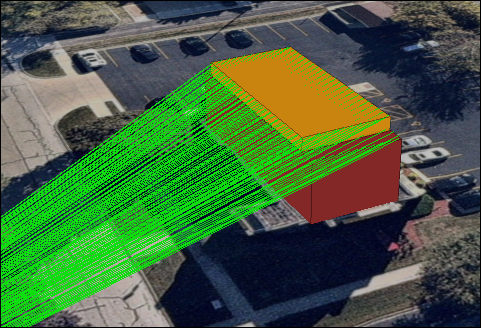
下图显示了当使用“视线”工具时,观测点的视线可见性。
文章 ID: 000032692
获得人工智能支持
使用 Esri Support AI Chatbot 快速解决您的问题。


相关信息
发现关于本主题的更多内容

Search for related information

Find training related to this topic

Explore ideas and give feedback
获取来自 ArcGIS 专家的帮助
立即开始聊天