
PROBLEMA
No se puede clonar el entorno Python en ArcGIS Pro. WinError 206 El nombre del archivo o la extensión son demasiado largos
Descripción
En ArcGIS Pro, los intentos de clonar un entorno Python fallan y se devuelve el siguiente error:
Error:
InvalidArchiveError("Error with archive C:\\Users\\<username>\\AppData\\Local\\ESRI\\conda\\pkgs\\tensorflow-base-2.7.0-py39_cuda11.1_cudnn8.1_6.tar.bz2. You probably need to delete and re-download or re-create this file. Message was:\n\nfailed with error: [WinError 206] The filename or extension is too long: 'C:\\\\Users\\\\<username>\\\\AppData\\\\Local\\\\ESRI\\\\conda\\\\pkgs\\\\tensorflow-base-2.7.0-py39_cuda11.1_cudnn8.1_6\\\\Lib\\\\site-packages\\\\tensorflow\\\\include\\\\external\\\\cudnn_frontend_archive\\\\_virtual_includes\\\\cudnn_frontend\\\\third_party\\\\cudnn_frontend\\\\include\\\\contrib\\\\nlohmann\\\\json'")

Causa
- La longitud de la ruta o el nombre de archivo del directorio del nuevo clon del entorno Python es demasiado largo.
- El paquete Conda existente está corrupto.
Solución o solución alternativa
Dependiendo de la causa, se aplican las soluciones alternativas proporcionadas.
Ajustar la longitud del nombre del archivo
Asegúrese de que el nombre del archivo y la ruta no superen la longitud máxima permitida en Windows de 260 caracteres. Consulte Microsoft Learn: Limitación de la longitud máxima de la ruta para obtener más información.
Limpie los archivos y paquetes Conda y active la propiedad de ruta larga en el Registro de Windows
Warning:
The instructions below include making changes to essential parts of the operating system. Esri recommends performing a backup of the operating system and files, including the registry, before proceeding.

Esri cannot guarantee results from incorrect modifications while following these instructions. Exercise caution. Consult a qualified computer systems professional if necessary.
- En el cuadro de búsqueda de Windows en la barra de tareas, busque y haga clic con el botón derecho en el Símbolo del sistema de Python y, a continuación, seleccione Ejecutar como administrador.
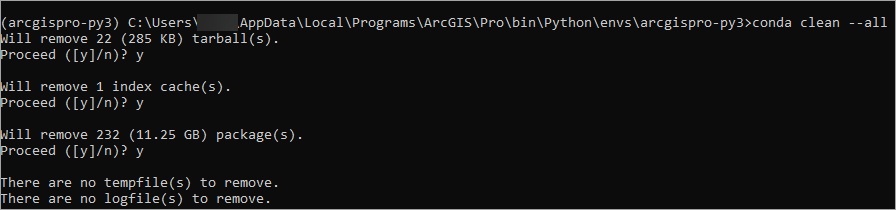
- Introduzca el siguiente comando para eliminar la caché del índice, los archivos bloqueados, los paquetes de caché no utilizados, los archivos tar y los archivos de registro.
conda clean –-all
- Escriba y para confirmar las siguientes indicaciones.
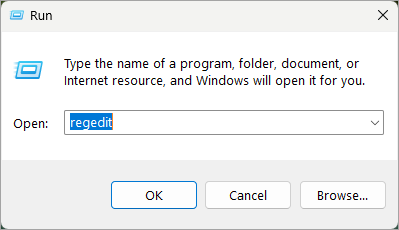
- En el cuadro de búsqueda de Windows en la barra de tareas, busque y haga clic en Ejecutar.
- Escriba regedit y hazga clic en OK para abrir la ventana del Editor del registro.
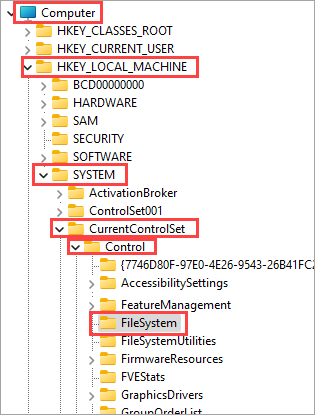
- En la ventana del Editor del registro, vaya a Equipo > HKEY_LOCAL_MACHINE > SYSTEM > CurrentControlSet > Control > FileSystem.
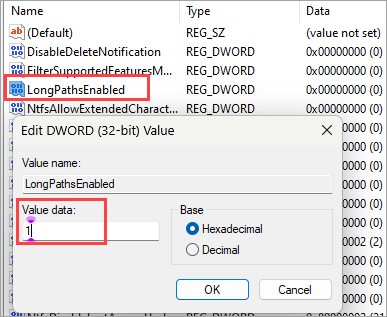
- Haga doble clic en LongPathsEnabled para definir el parámetro Datos de valor de 0 a 1. Haga clic en Aceptar.
- Reinicie el equipo antes de lanzar ArcGIS Pro para clonar un nuevo entorno de Python a través del Administrador de paquetes en ArcGIS Pro o la Ventana de comandos de Python.
Note:
Alternatively, perform a clean uninstall and reinstall of ArcGIS Pro before cloning a new Python environment.
Id. de artículo: 000032633
Obtenga soporte con IA
Resuelva su problema rápidamente con el chatbot de inteligencia artificial de soporte de Esri.


Información relacionada
Descubrir más sobre este tema

Search for related information

Find training related to this topic

Explore ideas and give feedback
Obtener ayuda de expertos en ArcGIS
Empieza a chatear ahora