
PROBLEM
Unable to publish scene layers after upgrading to ArcGIS Enterprise 11.4 or later
Description
After upgrading ArcGIS Enterprise to version 11.4 or later, publishing web scene layers from ArcGIS Pro fails and returns the following error message:
Error:
Your portal does not support publishing web scene layers.

Cause
This issue occurs when the object store is not configured in ArcGIS Data Store during an upgrade to ArcGIS Enterprise 11.4 or later. Starting with version 11.4, publishing new hosted scene layers from ArcGIS Pro requires an object store to manage scene layer caches. The previously supported tile cache data store is deprecated and no longer used. Refer to Portal for ArcGIS: object store for more information.
Without the object store, publishing scene layers from ArcGIS Pro fails, and the ArcGIS 3D Analyst extension license is shown as "false" or disabled in the ArcGIS Server Administrator Directory, indicating the object store functionality is unavailable.
Solution or Workaround
To enable publishing of scene layers in ArcGIS Enterprise 11.4 or later, configure the object store in ArcGIS Data Store.
- Install the object store in the ArcGIS Data Store installation.
- On Windows, search for and open the Add or remove programs system settings.
- On the Apps & features page, click ArcGIS Data Store and select Modify.
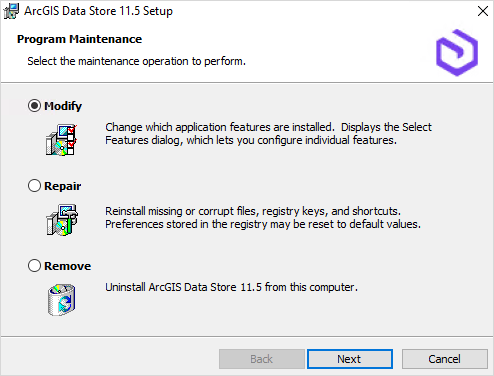
- In the ArcGIS Data Store Setup window, select Modify and click Next.
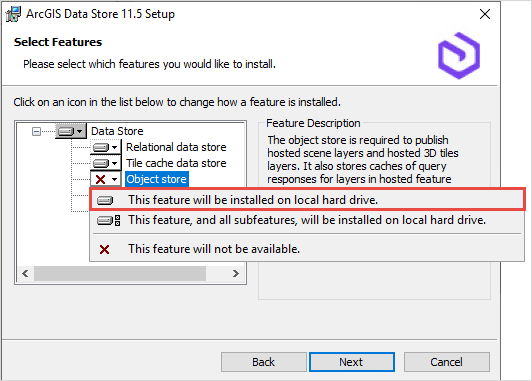
- In the Data Store list, click Object store and select This feature will be installed on local hard drive.. Click Next.
- Click Install to complete the setup.
- Configure the object store using the Data Store configuration wizard. Refer to ArcGIS Enterprise: Create a data store using the Data Store configuration wizard for instructions.
- Restart ArcGIS Server to apply the configuration changes. Refer to ArcGIS Server: Start and stop services for instructions.
Note:
After upgrading to ArcGIS Enterprise 11.4 or later, it is recommended to migrate existing hosted scene layer caches to the object store. Refer to ArcGIS Server: Migrate hosted scene layer caches using the MigrateSceneServices utility for more information.
Article ID: 000036920
- ArcGIS Data Store
- ArcGIS Pro
- ArcGIS Server
- ArcGIS Enterprise
Get support with AI
Resolve your issue quickly with the Esri Support AI Chatbot.


Related Information
Discover more on this topic

Search for related information

Find training related to this topic

Explore ideas and give feedback
Get help from ArcGIS experts
Start chatting now