
PROBLEM
The LEVEL_ID field from the ArcGIS Enterprise portal or ArcGIS Online does not display in ArcGIS Field Maps Designer
Description
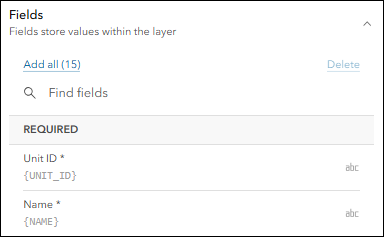
When configuring a floor-aware web map in Field Maps Designer, the LEVEL_ID field does not appear in the Fields list. However, when viewing the same web map in the ArcGIS Enterprise portal or ArcGIS Online, the LEVEL_ID field is visible in the layer attribute table. This prevents configuration of forms or field visibility in Field Maps Designer.
The image below shows the LEVEL_ID field not displayed in Field Maps Designer.
Cause
This issue occurs when the layer is configured as floor-aware in the ArcGIS Enterprise portal or ArcGIS Online. The LEVEL_ID is a system-reserved field used by the floor-awareness framework to link operational layers to floor levels and enable floor filtering. Field Maps Designer hides it to prevent configuration changes that could disrupt the floor-aware structure. Refer to ArcGIS Field Maps: Create a map for more information.
Solution or Workaround
To make the layer editable or configurable in Field Maps Designer, remove the floor-aware layer for the web map in the ArcGIS Enterprise portal or ArcGIS Online.
Note:
This workflow makes the web map unavailable for use in ArcGIS Indoors apps.
- Log in to the ArcGIS Enterprise portal or ArcGIS Online and click Content > My Content.
- Open the web map. Refer to Portal for ArcGIS: View maps (Map Viewer) or ArcGIS Online: View maps (Map Viewer) for instructions.
- In the Contents (dark) toolbar, click Map properties.
- In the Map properties pane, under Additional layers, click X next to each floor-aware layer to remove it.
- Save the map. Refer to Portal for ArcGIS: Save maps (Map Viewer) or ArcGIS Online: Save maps (Map Viewer) for instructions and more information.
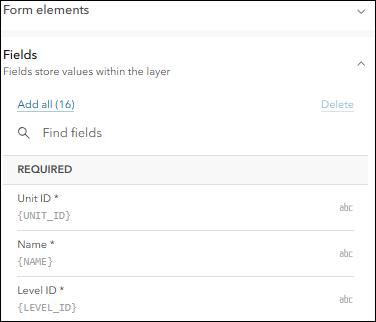
The image below shows the LEVEL_ID field displayed in Field Maps Designer and available for form configuration.
Article ID: 000038597
- ArcGIS Online
- Portal for ArcGIS
- ArcGIS Enterprise
- ArcGIS Field Maps Designer
Get support with AI
Resolve your issue quickly with the Esri Support AI Chatbot.


Related Information
Discover more on this topic

Search for related information

Find training related to this topic

Explore ideas and give feedback
Get help from ArcGIS experts
Start chatting now