
PROBLEM
Point feature size updates are not reflected in ArcGIS Pro
Description
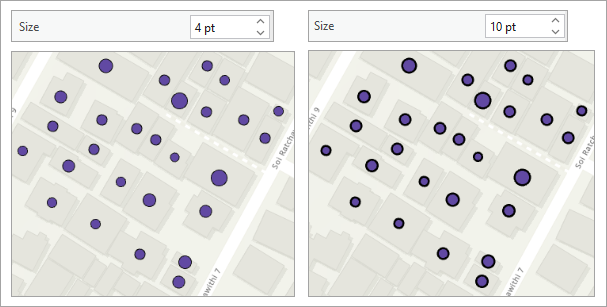
In ArcGIS Pro, when specifying the size of varying symbols based on attribute data, it may not lead to noticeable changes in the size of point features on the map. Instead, the outline of the symbol may appear thicker, while the overall symbol size remains nearly the same. This often occurs when the attribute values vary only slightly or are uniform across features. As a result, the symbology may not produce meaningful visual differences, especially when the symbol style emphasizes outlines more than the fill.
The image below illustrates the effect of increasing the symbol size, which causes the outline to become wider while the actual symbol size stays the same.
Cause
The point feature layer is configured with attribute-driven symbology, where the symbol size is connected to values in the feature attributes. In some cases, the associated attribute values are the same or differ slightly, resulting in symbol appearances either similar or only slightly different, and creating difficulty in recognizing a connection between the symbols and the attribute values.
Solution or Workaround
The workaround to display the specified symbol size correctly is to remove the existing connecting property between the attribute and the symbol of the point features.
- Open the ArcGIS Pro project.
- Remove the existing attribute-driven symbology connecting properties.
- In the Contents pane, right-click the point feature layer and click Symbology.
- In the Symbology pane, click the Vary symbology by attribute tab
 .
. - Under Vary symbology by attribute, expand Size.
- Click the Field drop-down arrow and select <None>.
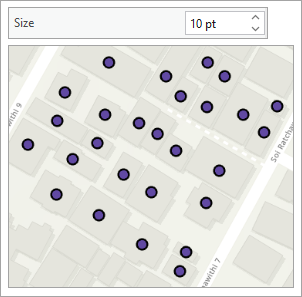
The specified point feature symbol size is reflected correctly in the map view.
Article ID: 000036943
- ArcGIS Pro
Get support with AI
Resolve your issue quickly with the Esri Support AI Chatbot.


Related Information
Discover more on this topic

Search for related information

Find training related to this topic

Explore ideas and give feedback
Get help from ArcGIS experts
Start chatting now