
PROBLEM
Gradient stroke on polygon feature layer distorted after PDF export in ArcGIS Pro 3.5
Description
In ArcGIS Pro 3.5, the gradient stroke is broken and jagged on the polygon feature layer after the map or layout is exported as a Vector PDF or GeoReferenced PDF. In some instances, the following warning message is returned.
Warning:
Capability not supported in export format, some content is being rasterized.
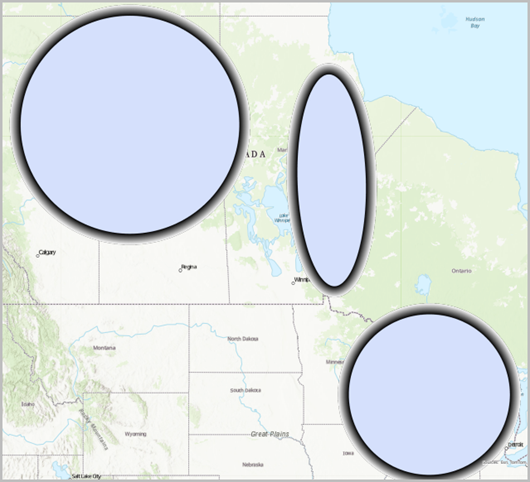
Cause
This is a known limitation in ArcGIS Pro 3.5 as addressed in BUG-000176930.
Solution or Workaround
To work around this limitation, apply the following steps to rasterize the feature layer and export it to a PDF.
- Open the ArcGIS Pro project with the gradient stroke polygon feature layer.
- Rasterize the polygon feature layer before exporting it to a PDF.
- In the Contents pane, right-click the polygon feature layer, and click Properties.
- In the Layer Properties dialog box, on the General tab, check the Rasterize layer in exported file check box.
- Publish the layout as a PDF. Refer to ArcGIS Pro: Export to PDF for more information.
- On the Share tab, in the Output group, click Export Layout and click Flattened PDF.
- In the Export Layout pane, click Export.
Note:
Alternatively, check the Output as image check box in the Export Map or Export Layout pane when exporting to a PDF. However, this approach is best suited as a workaround for cases where the output is only needed for visual output, since the entire file is rasterized and loses scalability and searchability.
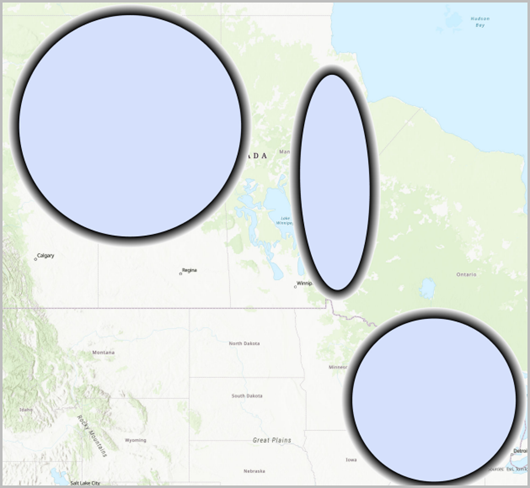
The image below shows the gradient strokes on the polygon feature layers display correctly after it is exported to a PDF.
Article ID: 000037183
- ArcGIS Pro
Get support with AI
Resolve your issue quickly with the Esri Support AI Chatbot.


Related Information
Discover more on this topic

Search for related information

Find training related to this topic

Explore ideas and give feedback
Get help from ArcGIS experts
Start chatting now