
PROBLEM
Choice list does not include all attribute values in ArcGIS Survey123
Description
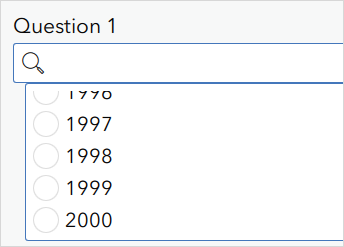
When using a search expression to populate a choice list with values from a feature layer, not all available attribute values are displayed.
In this example, the search expression returns a maximum of 2,000 features from a feature layer containing more than 2,000 records.
Cause
The maximum record count of the feature layer is lower than the total number of features. The number of features returned by the ArcGIS Survey123 search expression is determined by the maxRecordCount property, which has a default value of 2,000. Consequently, only features within the maxRecordCount limit are included in the choice list, while records exceeding the threshold are not returned.
Solution or Workaround
Use the ArcGIS REST API to increase the maxRecordCount property of the feature layer to match the number of features returned in the ArcGIS Survey123 choice question.
In ArcGIS Online
- On the feature layer’s item page, under URL, click View to open the ArcGIS REST Services Directory window.
- In the ArcGIS REST Services Directory window, click Admin.
- Under Layers, select the root layer.
- At the bottom of the page, for Supported Operations, click Update Definition.
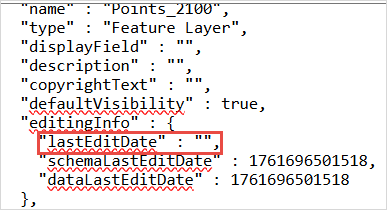
- In the Update Layer Definition text box, search for "lastEditDate" and replace the value with "".
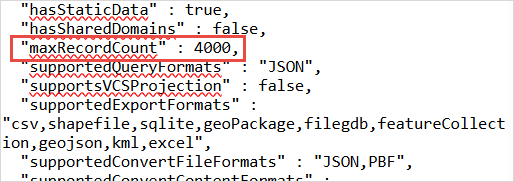
- Search for "maxRecordCount" and increase its value. In this example, the value is increased from 2,000 to 4,000.
- Click Update Layer Definition.
In the ArcGIS Enterprise portal
Use the ArcGIS Server Administrator Directory to increase the maximum record count of the feature layer. Refer to Problem: Unable to edit the maximum record count for feature services in Portal for ArcGIS for instructions.
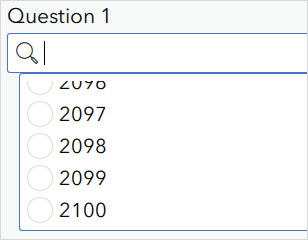
Updating the maxRecordCount property to match the number of features in the feature layer allows ArcGIS Survey123 to return and display the complete list of attribute values when using the search expression, as shown in the image below.
Article ID: 000036996
- ArcGIS REST API
- ArcGIS Online
- Portal for ArcGIS
- ArcGIS Survey123
Get support with AI
Resolve your issue quickly with the Esri Support AI Chatbot.


Related Information
Discover more on this topic

Search for related information

Find training related to this topic

Explore ideas and give feedback
Get help from ArcGIS experts
Start chatting now