
PROBLEM
ArcGIS Survey123 field app does not preserve default field length of multiline text questions configured in Survey123 web designer
Description
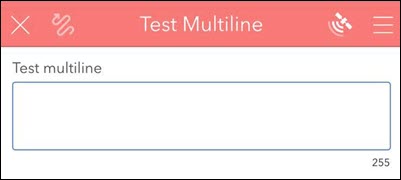
In the ArcGIS Survey123 web designer, multiline text questions have a default field length of 1000 characters. However, when the survey is published and accessed using the ArcGIS Survey123 field app, the character limit is reduced to 255 characters and does not reflect the default field length configured in the Survey123 web designer, as shown in the image below.
Cause
This issue is a known limitation in the Survey123 field app. The schema settings applied in the Survey123 web designer are not fully honored by the field app, leading to the reduced character limit. Refer to BUG-000118040 and BUG-000177400 for more information.
Solution or Workaround
Apply one of the following options to work around this limitation.
Use the ArcGIS Survey123 web app to collect multiline text responses
To allow longer responses to multiline text questions, use the Survey123 web app instead of the field app.
Click the survey link to open the survey in the Survey123 web app. Ensure the link is accessible and opens directly in the web app. Refer to ArcGIS Survey123: Open a survey for instructions and more information.
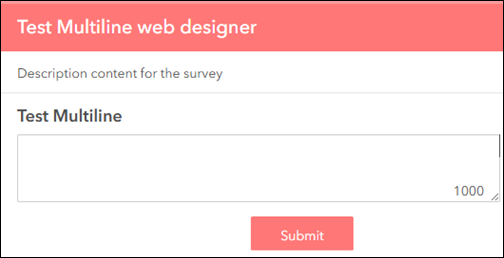
The image below shows the multiline text question displayed in the Survey123 web app.
Specify the field length value in the bind::esri:fieldType column in ArcGIS Survey123 Connect
- Open ArcGIS Survey123 Connect.
- On the My Survey Designs tab, select the survey created in the Survey123 web designer from the gallery. When prompted, click Download to download the survey, and click OK.
- Click the downloaded survey and click XLSForm
 to open the XLSForm file.
 - In the survey worksheet, navigate to the bind::esri:fieldLength column for the preferred multiline text question and specify the preferred field length value. In this example, the value is specified as 1000. Click Save and close the worksheet.

- Click Update and click Publish to republish the survey form. When prompted, click Publish survey to update the survey without affecting the existing data and click OK. Refer to ArcGIS Survey123: Update a survey for more information.
- In the Survey123 field app, download and open the republished survey from Step 5.
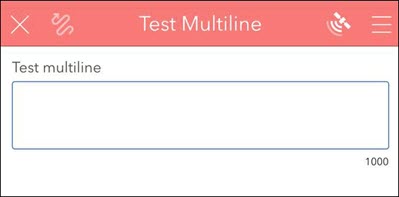
The image below shows the updated multiline text question in the Survey123 field app, which supports responses of up to 1000 characters.
Article ID: 000037688
- ArcGIS Survey123
Get support with AI
Resolve your issue quickly with the Esri Support AI Chatbot.


Related Information
Discover more on this topic

Search for related information

Find training related to this topic

Explore ideas and give feedback
Get help from ArcGIS experts
Start chatting now