
HOW TO
Split a circle polygon into half in ArcMap
Summary
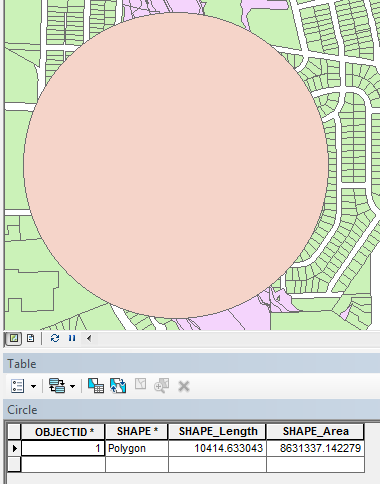
In some instances, it is necessary to split a circular area in half. The image below shows a circle with its attribute table before it is split. The total area is roughly 8,631,337 square feet.
Procedure
To split a circle into half using Cut Polygons Tool, follow the steps below:
- In ArcMap, start an edit session. Select the circle 'polygon' to split.
Note:
If the Editor toolbar does not appear, click Customize > Toolbars > Editor.
- In the Editor toolbar, click the Cut Polygons Tool icon
 . The Straight Segment icon is automatically selected
  .
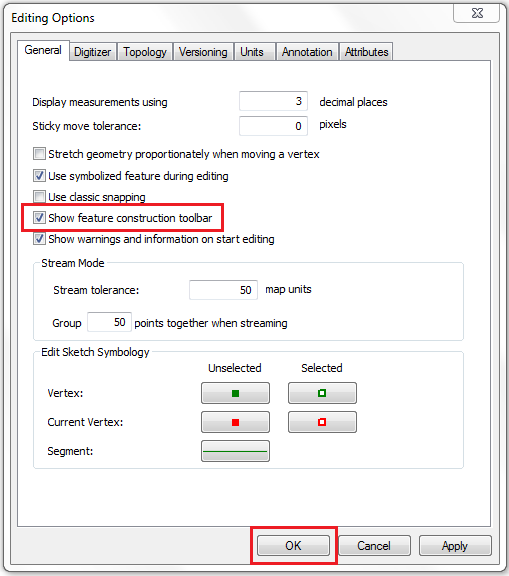
. - Click Editor > Options. In the Editing Options window, enable the Show feature construction toolbar option, and click OK.
- Click anywhere at the edge of the circle. The Feature Construction toolbar appears.

Note:
To ease line construction, enable snapping options by clicking Editor > Snapping > Snapping Toolbar.
- In the Feature Construction toolbar, click the Constrain Perpendicular icon
 . Creating a straight line that is perpendicular to any edge of a circle draws across the centroid to split the circle in half. For more information on creating a line at an angle, refer to ArcMap: Creating a segment using an angle and a length.
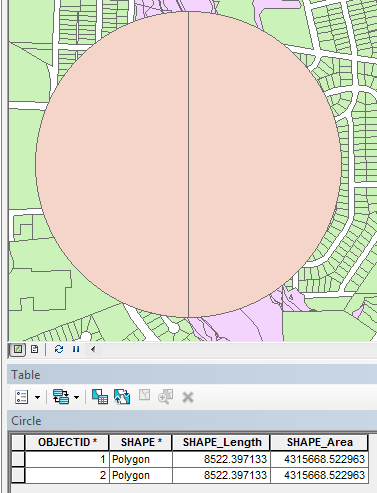
 - Draw a straight line across the circle and snap the line at the other edge of the circle. The circle automatically splits. Opening the attribute table shows the circle is split into two. In this example, each half has an area of roughly 4,315,668 square feet.
Article ID: 000010855
Software:
- ArcMap
Get support with AI
Resolve your issue quickly with the Esri Support AI Chatbot.


Related Information
Discover more on this topic

Search for related information

Find training related to this topic

Explore ideas and give feedback
Get help from ArcGIS experts
Start chatting now