
HOW TO
Identify features with true curves using ArcPy in ArcGIS Pro
Summary
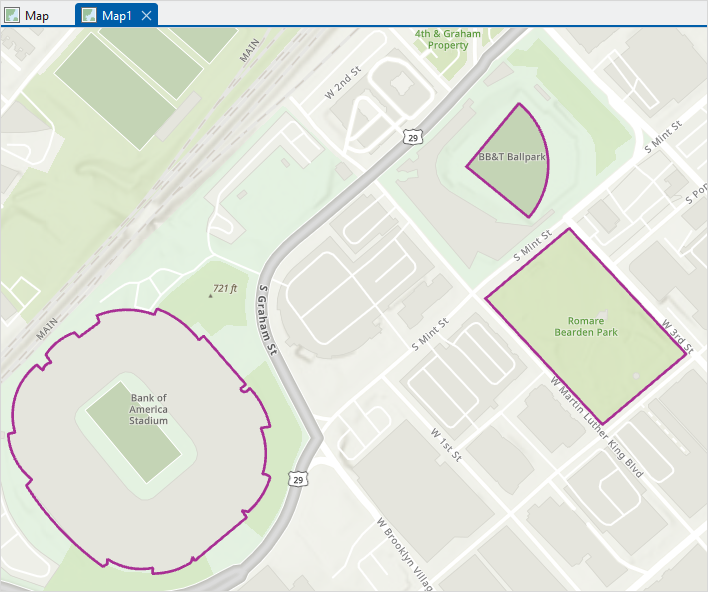
Publishing features with true curve geometry from ArcGIS Pro may cause compatibility issues in certain ArcGIS workflows. For instance, ArcGIS Field Maps does not support true curves for offline sync, which can prevent datasets from being taken offline. To ensure broader compatibility across ArcGIS platforms, it is useful to identify features that contain true curve segments and, if necessary, remove or convert them to supported geometry types. The hasCurves property in ArcPy can be used to determine whether a feature’s geometry includes true curve segments.
This article outlines the workflow to identify and list features with true curve geometry using ArcPy in ArcGIS Pro.
Procedure
Note:
This workflow requires a full script to run in the ArcGIS Pro Python window. The indents must be retained as portrayed in the code block.
- In ArcGIS Pro, open the map containing the line or polygon features.
- Open the Python window. Refer to ArcGIS Pro: Python window for more information.
- Run the following script:
- Import the necessary module.
import arcpy
- Create an empty list to store the object IDs of features with true curves.
curveFeatures = []
- Define the feature class containing the line or polygon features in the file geodatabase.
feature_class = r'<pathname>'
- Identify curved geometry using the .hasCurves property and append the object ID of each curved feature to the curveFeatures list.
with arcpy.da.SearchCursor(feature_class, ['OID@', 'SHAPE@']) as cursor:
for row in cursor:
        if (row[1]).hasCurves == True:
            curveFeatures.append(row[0])
- Print the results.
print(curveFeatures)
- Place the cursor at the end of the script and press Enter twice to run the script.
The code below demonstrates the full working script.
import arcpy
curveFeatures = []
feature_class = r'C:\Users\TrueCurve_ReleaseProject_368d3a\commondata\truecurve_releaselab.gdb\TrueCurves'
with arcpy.da.SearchCursor(feature_class, ['OID@', 'SHAPE@']) as cursor:
    for row in cursor:
        if (row[1]).hasCurves == True:
            curveFeatures.append(row[0])
print(curveFeatures)
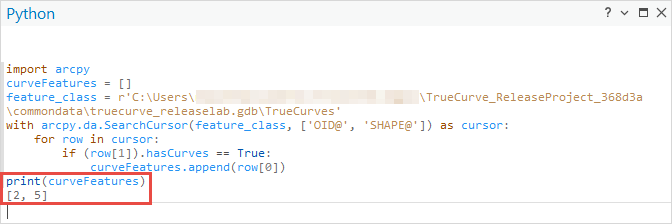
The image below shows the object IDs of the line or polygon features with true curves printed in the Python window.
Article ID: 000035938
- ArcGIS Pro
Get support with AI
Resolve your issue quickly with the Esri Support AI Chatbot.


Related Information
Discover more on this topic

Search for related information

Find training related to this topic

Explore ideas and give feedback
Get help from ArcGIS experts
Start chatting now