
HOW TO
Identify duplicate field value using ArcGIS Arcade in a Map Viewer form configuration
Summary
In Map Viewer, duplicate-value validation can be applied to ensure data integrity and prevent users from entering repeated values in key identifier fields. This article provides the workflow to detect duplicate entries using Arcade by populating 'Duplicate' in the form-calculated field.
Procedure
Note:
Ensure an empty string field is created for the Arcade expression configuration before attempting the workflow provided. Refer to ArcGIS Online: Add a field or Portal for ArcGIS: Add a field for more information.
- Open the web map in Map Viewer.
- In the Layers pane, select the layer. In this example, the feature layer 'Test' is selected.
- On the Settings (light) toolbar, navigate to Configure editing and click Forms.
- In the Configure form window, under the Form builder pane, under Fields, double-click the field containing the value to be validated. In this example, the field Asset_ID is used.
- Click the selected field to open the Properties pane.
- In the Properties pane, under Logic, ensure the Editable, Required, and Visible checkboxes are selected.
- Close the Properties pane.
- In the same Form builder pane, under Fields, double-click the field to be configured with the Arcade expression. In this example, the field Duplicate_Checker is used.
- Click the selected field to open the Properties pane.
- In the Properties pane, under Logic, for Calculation expression, click Expressions.
- In the Calculated expressions window, click + New expression.
- In the Arcade editor window, configure the expression below.
- Replace <feature_layer_name> with the name of the feature class containing the field to check for duplicate values. In this example, 'Test' is used.
- Replace <field_name> with the name of the field in the attribute table to check for duplicate values. In this example, Asset_ID is used.
var features = FeatureSetByName($datastore, '<feature_layer_name>', ['<field_name>', 'OBJECTID'], false);

for (var i in features) {
    if ((i.<field_name> == $feature.<field_name>) && (i.OBJECTID != $feature.OBJECTID)) {
        return "Duplicate";
    }
}

return "Accepted";
The code below demonstrates the full working script.
var features = FeatureSetByName($datastore, 'Test', ['Asset_ID', 'OBJECTID'], false);

for (var i in features) {
    if ((i.Asset_ID == $feature.Asset_ID) && (i.OBJECTID != $feature.OBJECTID)) {
        return "Duplicate";
    }
}

return "Accepted";
- Click Done.
- Click OK to save the form.
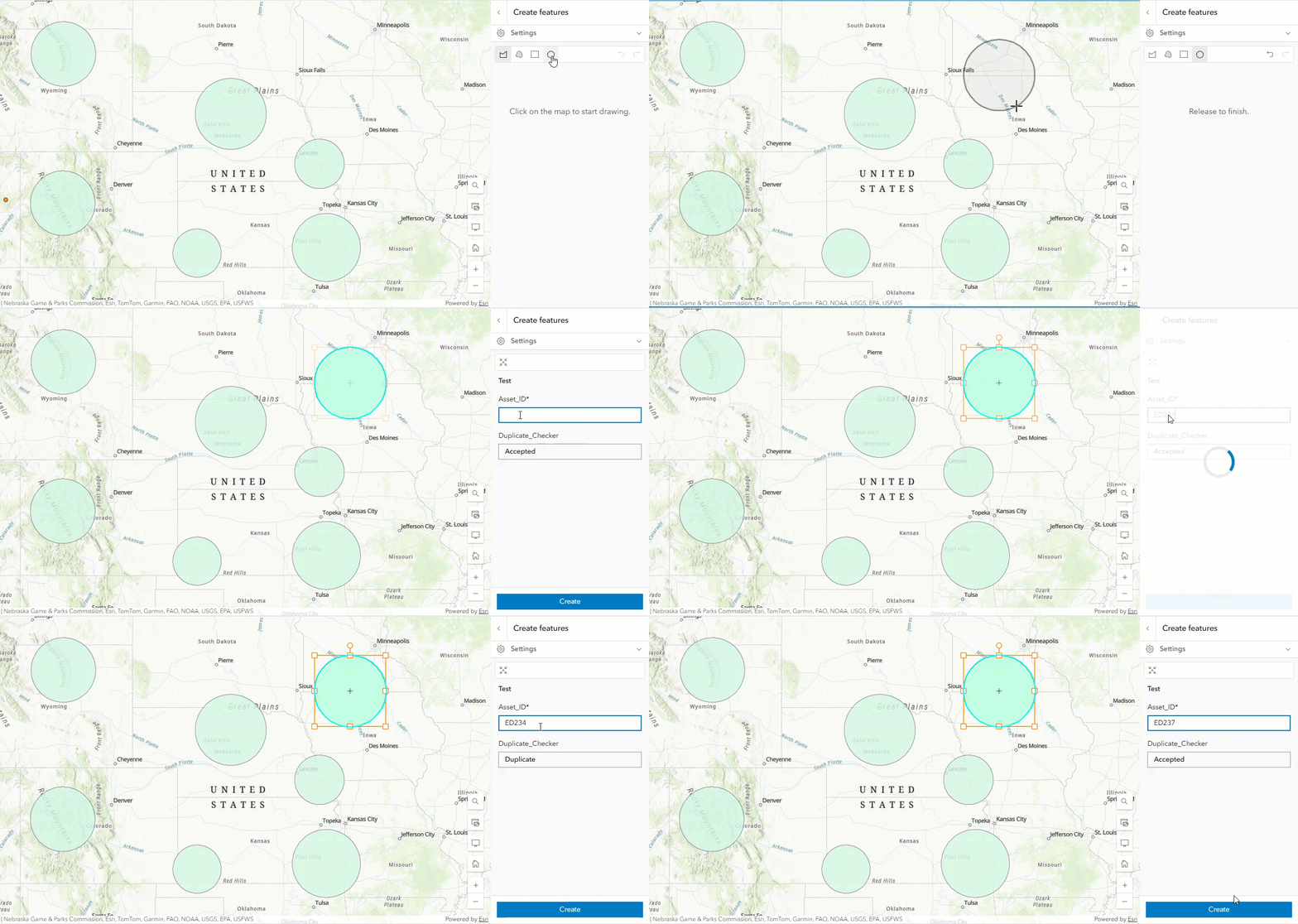
The map shows 'Duplicate' populated when a record with the duplicate asset ID is specified and a new feature is created.
Article ID: 000035700
- ArcGIS Online
- Portal for ArcGIS
- ArcGIS Enterprise
Get support with AI
Resolve your issue quickly with the Esri Support AI Chatbot.


Related Information
Discover more on this topic

Search for related information

Find training related to this topic

Explore ideas and give feedback
Get help from ArcGIS experts
Start chatting now