
HOW TO
Derive interval-based coordinates and elevation from DWG files in ArcGIS Pro
Summary
DWG files are a CAD file format commonly used in land surveying and cadastral mapping to store drawing geometry and elevation values. These files can be imported into ArcGIS Pro and converted to geodatabase feature classes for further analysis and integration with other spatial data. In ArcGIS Pro, interval-based coordinates can be derived by converting CAD features to GIS features and generating points at specified intervals along line or other geometry features. Elevation values can be obtained either from existing Z-values in the DWG file or by interpolating elevations from a surface such as a DEM or TIN. Complete the workflow provided to derive interval-based coordinates and elevation from DWG files in ArcGIS Pro.
Procedure
- Open the ArcGIS Pro project.
- Convert the DWG file to a geodatabase using the CAD To Geodatabase tool. Refer to How To: Convert CAD data to GIS data in ArcGIS Pro for instructions.
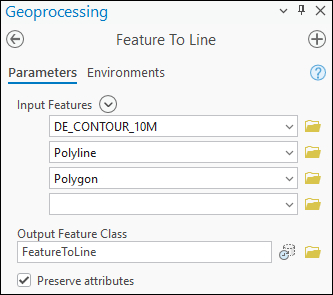
- Convert the output feature classes created in Step 2 to line features using the Feature To Line tool. For Input Features, select all the output features to generate a single line layer.
Note:
To create point features from existing vertices without using a fixed interval, use the Feature Vertices To Points tool.
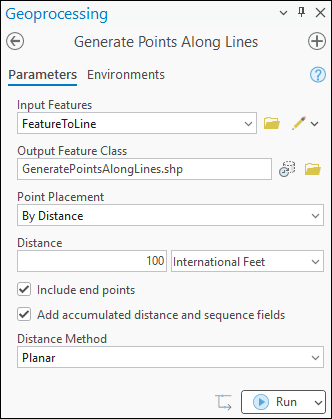
- Create point features along the lines at a fixed or specified interval using the Generate Points Along Lines tool. Specify the Distance parameter, and check the Include end points and the Add accumulated distance and sequence fields check boxes.
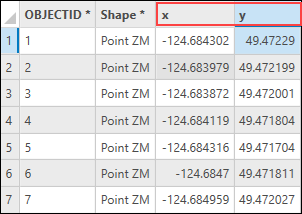
- Derive the coordinates from the point features using the Calculate Geometry Attributes tool. Refer to How To: Calculate the XY coordinates of point features in ArcGIS Pro for instructions.
- Add the elevation layer to the map. Refer to ArcGIS Pro: Browse to data to add to a map or scene for instructions.
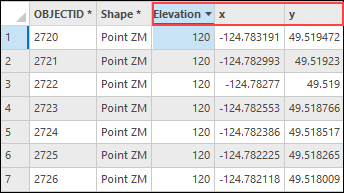
- Extract the elevation values from the raster layer using the Extract Values to Points tool.
Note:
The 'Extract Values to Points' tool requires a Spatial Analyst license.
Article ID: 000039656
- ArcGIS Pro
Get support with AI
Resolve your issue quickly with the Esri Support AI Chatbot.


Related Information
Discover more on this topic

Search for related information

Find training related to this topic

Explore ideas and give feedback
Get help from ArcGIS experts
Start chatting now