
HOW TO
Create a web map from a JSON file using ArcGIS API for Python 2.4
Summary
Creating a web map with a script is usually preferred as the process can be automated for multiple web maps. These web maps can be created from a JSON file representation using the folder.add function in ArcGIS API for Python 2.4 by:
- reading the JSON file within the script, or
- defining the JSON description in the script.
Note:
Defining the JSON description is a longer process. However, it provides the ability to modify the JSON representation of the script.
Procedure
Create the web map from the JSON file by reading it using the json module
Note:
Upload the JSON file in the working directory of the notebook environment before running the script.
- Import the necessary modules.
from arcgis.gis import GIS
from arcgis.map import Map
import json
- Specify the login credentials.
#For ArcGIS Online
gis = GIS('https://arcgis.com', '<username>', '<password>')

#For Portal for ArcGIS
gis = GIS('https://<machine>.<domain>/<web adaptor name>/home', 'username', 'password', verify_cert=False)

print ('Connected')
- Open the JSON file.
with open('/home/jupyter/test2.json') as json_data:
	data = json.load(json_data)
- Create the new map.
item_properties_dict = {"type": "Web Map","title": "Test Map","tags": ["test","test1","test2"],"snippet":"This is a snippet", "text":data}

folder = gis.content.folders.get()
newmap = folder.add(item_properties = item_properties_dict)
newmap
The following shows the full script:
from arcgis.gis import GIS
from arcgis.map import Map
import json

#For ArcGIS Online
gis = GIS('https://arcgis.com', '<username>', '<password>')

print ('Connected')

with open('/home/jupyter/test2.json') as json_data:
	data = json.load(json_data)

item_properties_dict = {"type": "Web Map","title": "Test Map","tags": ["test","test1","test2"],"snippet":"This is a snippet", "text":data}

folder = gis.content.folders.get()
newmap = folder.add(item_properties = item_properties_dict)
newmap
Create the web map by defining the JSON description in the script
- Follow steps 1 and 2 from the method above.
- Define the dictionary containing the JSON used to create the web map.
data = {
	"operationalLayers": [{
			"id": "layer_2382",
			"layerType": "ArcGISMapServiceLayer",
			"url": "https://sampleserver6.arcgisonline.com/arcgis/rest/services/Census/MapServer",
			"visibility": True,
			"opacity": 1,
			"title": "Census Data",
			"layers": [{
					"id": 0,
					"layerDefinition": {
						"source": {
							"type": "mapLayer",
							"mapLayerId": 0
						}
					},
					"name": "Census Block Points",
					"minScale": 99999.99998945338,
					"maxScale": 0,
					"parentLayerId": -1,
					"defaultVisibility": True
				}, {
					"id": 1,
					"layerDefinition": {
						"source": {
							"type": "mapLayer",
							"mapLayerId": 1
						},
						"drawingInfo": {
							"renderer": {
								"type": "simple",
								"label": "",
								"description": "",
								"symbol": {
									"color": [0, 0, 0, 0],
									"outline": {
										"color": [230, 230, 0, 255],
										"width": 0.39975000000000005,
										"type": "esriSLS",
										"style": "esriSLSSolid"
									},
									"type": "esriSFS",
									"style": "esriSFSSolid"
								}
							}
						}
					},
					"name": "Census Block Group",
					"minScale": 1000000,
					"maxScale": 0,
					"parentLayerId": -1,
					"defaultVisibility": True
				}, {
					"id": 2,
					"layerDefinition": {
						"source": {
							"type": "mapLayer",
							"mapLayerId": 2
						},
						"drawingInfo": {
							"renderer": {
								"type": "simple",
								"label": "",
								"description": "",
								"symbol": {
									"color": [0, 0, 0, 0],
									"outline": {
										"color": [230, 230, 0, 255],
										"width": 0.5625,
										"type": "esriSLS",
										"style": "esriSLSSolid"
									},
									"type": "esriSFS",
									"style": "esriSFSSolid"
								}
							}
						}
					},
					"name": "Detailed Counties",
					"minScale": 0,
					"maxScale": 0,
					"parentLayerId": -1,
					"defaultVisibility": True
				}, {
					"id": 3,
					"layerDefinition": {
						"source": {
							"type": "mapLayer",
							"mapLayerId": 3
						},
						"drawingInfo": {
							"renderer": {
								"type": "simple",
								"label": "",
								"description": "",
								"symbol": {
									"color": [0, 0, 0, 0],
									"outline": {
										"color": [230, 230, 0, 255],
										"width": 2,
										"type": "esriSLS",
										"style": "esriSLSSolid"
									},
									"type": "esriSFS",
									"style": "esriSFSSolid"
								}
							}
						}
					},
					"name": "states",
					"minScale": 0,
					"maxScale": 0,
					"parentLayerId": -1,
					"defaultVisibility": True
				}
			]
		}
	],
	"baseMap": {
		"baseMapLayers": [{
				"id": "labels",
				"layerType": "ArcGISTiledMapServiceLayer",
				"url": "https://services.arcgisonline.com/arcgis/rest/services/Canvas/World_Dark_Gray_Base/MapServer",
				"visibility": True,
				"opacity": 1,
				"title": "World_Dark_Gray_Base"
			}, {
				"id": "base",
				"layerType": "ArcGISTiledMapServiceLayer",
				"url": "https://services.arcgisonline.com/arcgis/rest/services/Canvas/World_Dark_Gray_Reference/MapServer",
				"visibility": True,
				"opacity": 1,
				"title": "World_Dark_Gray_Reference"
			}
		],
		"title": "Basemap"
	},
	"spatialReference": {
		"wkid": 102100,
		"latestWkid": 3857
	},
	"authoringApp": "WebMapViewer",
	"authoringAppVersion": "10.6.1",
	"version": "2.34"
}
- Create the new map.
item_properties_dict = {"type": "Web Map","title": "Test Map","tags": ["test","test1","test2"],"snippet":"This is a snippet", "text":data}

folder = gis.content.folders.get()
newmap = folder.add(item_properties = item_properties_dict)
newmap
The following shows the full script:
from arcgis.gis import GIS
from arcgis.map import Map
import json

#For Portal for ArcGIS
gis = GIS('https://<machine>.<domain>/<web adaptor name>/home', 'username', 'password', verify_cert=False)

print ('Connected')

data = {
	"operationalLayers": [{
			"id": "layer_2382",
			"layerType": "ArcGISMapServiceLayer",
			"url": "https://sampleserver6.arcgisonline.com/arcgis/rest/services/Census/MapServer",
			"visibility": True,
			"opacity": 1,
			"title": "Census Data",
			"layers": [{
					"id": 0,
					"layerDefinition": {
						"source": {
							"type": "mapLayer",
							"mapLayerId": 0
						}
					},
					"name": "Census Block Points",
					"minScale": 99999.99998945338,
					"maxScale": 0,
					"parentLayerId": -1,
					"defaultVisibility": True
				}, {
					"id": 1,
					"layerDefinition": {
						"source": {
							"type": "mapLayer",
							"mapLayerId": 1
						},
						"drawingInfo": {
							"renderer": {
								"type": "simple",
								"label": "",
								"description": "",
								"symbol": {
									"color": [0, 0, 0, 0],
									"outline": {
										"color": [230, 230, 0, 255],
										"width": 0.39975000000000005,
										"type": "esriSLS",
										"style": "esriSLSSolid"
									},
									"type": "esriSFS",
									"style": "esriSFSSolid"
								}
							}
						}
					},
					"name": "Census Block Group",
					"minScale": 1000000,
					"maxScale": 0,
					"parentLayerId": -1,
					"defaultVisibility": True
				}, {
					"id": 2,
					"layerDefinition": {
						"source": {
							"type": "mapLayer",
							"mapLayerId": 2
						},
						"drawingInfo": {
							"renderer": {
								"type": "simple",
								"label": "",
								"description": "",
								"symbol": {
									"color": [0, 0, 0, 0],
									"outline": {
										"color": [230, 230, 0, 255],
										"width": 0.5625,
										"type": "esriSLS",
										"style": "esriSLSSolid"
									},
									"type": "esriSFS",
									"style": "esriSFSSolid"
								}
							}
						}
					},
					"name": "Detailed Counties",
					"minScale": 0,
					"maxScale": 0,
					"parentLayerId": -1,
					"defaultVisibility": True
				}, {
					"id": 3,
					"layerDefinition": {
						"source": {
							"type": "mapLayer",
							"mapLayerId": 3
						},
						"drawingInfo": {
							"renderer": {
								"type": "simple",
								"label": "",
								"description": "",
								"symbol": {
									"color": [0, 0, 0, 0],
									"outline": {
										"color": [230, 230, 0, 255],
										"width": 2,
										"type": "esriSLS",
										"style": "esriSLSSolid"
									},
									"type": "esriSFS",
									"style": "esriSFSSolid"
								}
							}
						}
					},
					"name": "states",
					"minScale": 0,
					"maxScale": 0,
					"parentLayerId": -1,
					"defaultVisibility": True
				}
			]
		}
	],
	"baseMap": {
		"baseMapLayers": [{
				"id": "labels",
				"layerType": "ArcGISTiledMapServiceLayer",
				"url": "https://services.arcgisonline.com/arcgis/rest/services/Canvas/World_Dark_Gray_Base/MapServer",
				"visibility": True,
				"opacity": 1,
				"title": "World_Dark_Gray_Base"
			}, {
				"id": "base",
				"layerType": "ArcGISTiledMapServiceLayer",
				"url": "https://services.arcgisonline.com/arcgis/rest/services/Canvas/World_Dark_Gray_Reference/MapServer",
				"visibility": True,
				"opacity": 1,
				"title": "World_Dark_Gray_Reference"
			}
		],
		"title": "Basemap"
	},
	"spatialReference": {
		"wkid": 102100,
		"latestWkid": 3857
	},
	"authoringApp": "WebMapViewer",
	"authoringAppVersion": "10.6.1",
	"version": "2.34"
}

item_properties_dict = {"type": "Web Map","title": "Test Map","tags": ["test","test1","test2"],"snippet":"This is a snippet", "text":data}

folder = gis.content.folders.get()
newmap = folder.add(item_properties = item_properties_dict)
newmap
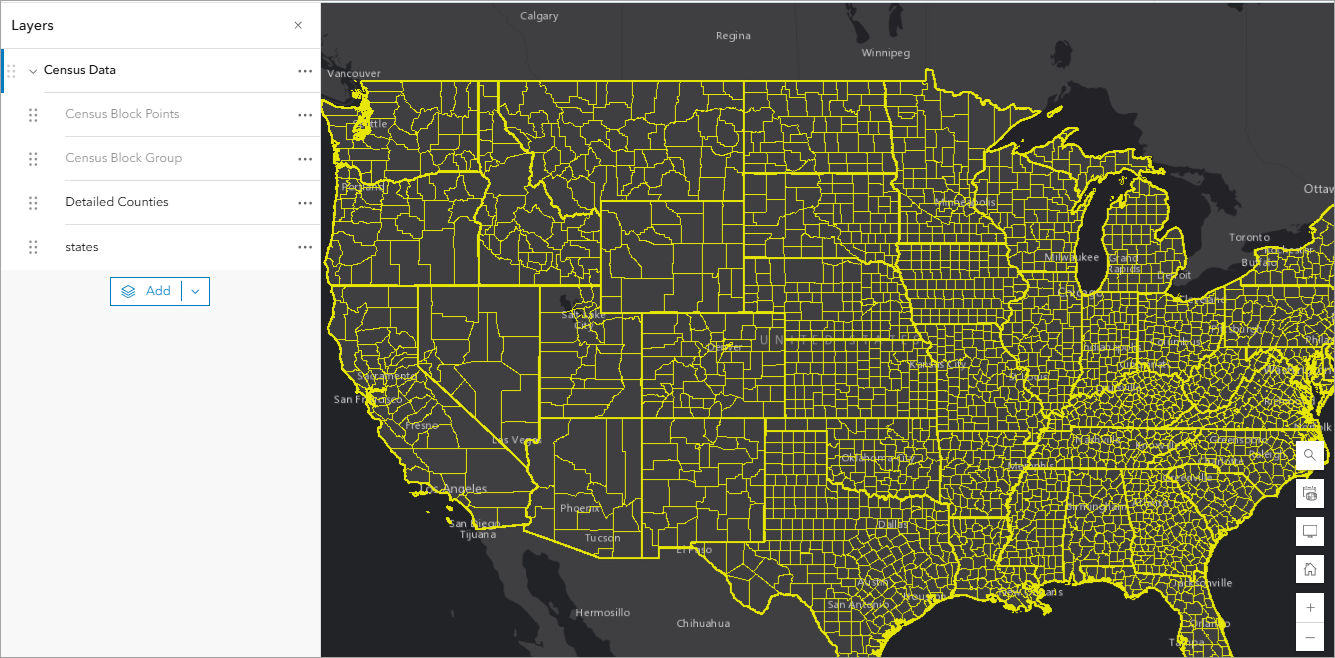
The image below shows the newly created web map.
Article ID: 000037797
Software:
- ArcGIS Online
- Portal for ArcGIS
- ArcGIS API for Python
- ArcGIS Enterprise
Get support with AI
Resolve your issue quickly with the Esri Support AI Chatbot.


Related Information
Discover more on this topic

Search for related information

Find training related to this topic

Explore ideas and give feedback
Get help from ArcGIS experts
Start chatting now