
Frequently asked question
How does ArcGIS Experience Builder support field data collection?
ArcGIS Experience Builder can be configured to support field data collection through a browser-based interface, allowing users to view, edit, and update feature layer data in real time. This provides an alternative for workflows that require ArcGIS Field Maps functionality without installing a dedicated mobile app. To leverage these capabilities, an experience must be set up with a web map containing the required operational layers, and editing must be enabled on those layers so field workers can update data directly within the experience.
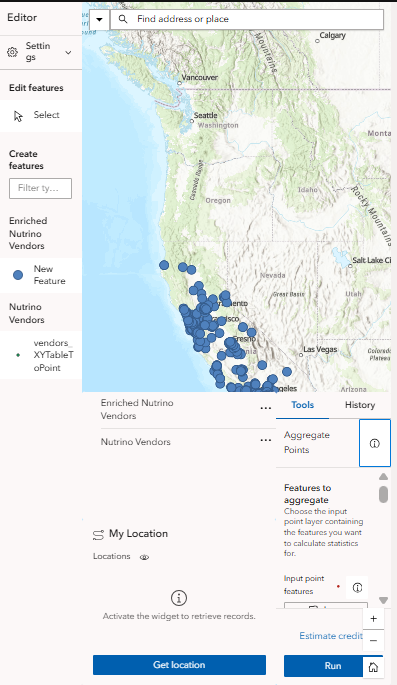
Feature editing, which is a core component of field data collection, can be performed using the Edit widget. This widget allows users to add, edit, and delete features as well as manage attachments, replicating the key functionality of Field Maps within a web app.
Location awareness is supported through the My Location widget, which includes the Get Location option to identify the user’s current position and quickly navigate to areas of interest. Location accuracy is determined by the device hardware, operating system, browser permissions, and available positioning sources such as GPS, Wi-Fi, or cellular networks. As this functionality relies on browser-based geolocation services, accuracy may be lower compared to the high-accuracy GPS positioning supported by the Field Maps mobile app.
Layer visibility and data management can be managed using the Map Layers widget, which allows users to toggle layers, apply filters, and export data. Additional widgets such as Analysis, Chart, Table, and List are useful in creating dynamic data visualizations by giving field workers immediate insight and clear representations of the data collection.
By default, the experience is designed for desktop view but can be configured for mobile devices using device-specific layouts by selecting the phone or tablet view buttons next to the ‘Live view’ button in the builder interface. This function optimizes the experience for smaller screens by adjusting widget placement, size, and behavior; enabling field workers to view maps and edit features effectively. Refer to ArcGIS Blog: Optimize an app layout for mobile in ArcGIS Experience Builder for more information.
Experience Builder does not support the same offline capabilities as Field Maps. Refer to ArcGIS Blog: Work offline with Field Maps for more information. An active internet connection is required, and the experience may not be suitable for use in locations with limited or unreliable connectivity.
The table below summarizes several ArcGIS Experience Builder capabilities for managing data in the field.
| Widget | Functionality |
|
Edit | Provides the ability to add, delete, edit, and add attachments to features |
|
My Location | Includes the Get Location option to identify the user’s current position, orient themselves on the map and quickly navigate to areas of interest |
| Map Layers | Provides the ability to toggle layer visibility, apply filters, adjust transparency, and export data |
| Analysis, Chart, Table, and List | Assist in creating dynamic data visualizations and summaries, providing field workers with immediate insight and clear representations of collected data |
The image below demonstrates the experience configured for field data collection.
Article ID: 000038966
- ArcGIS Experience Builder
Get support with AI
Resolve your issue quickly with the Esri Support AI Chatbot.


Related Information
Discover more on this topic

Search for related information

Find training related to this topic

Explore ideas and give feedback
Get help from ArcGIS experts
Start chatting now