
HOW TO
Access the REST admin endpoint in ArcGIS Enterprise and ArcGIS Online
Summary
Some operations can only be done through the admin endpoint of the REST API. Some of which would include: Add To Definition, Update Definition, Delete From Definition, and Generate Map Service Definition.
There are some articles stating that there should be a button saying "admin", as shown in the image below:

But this is not always the case, therefore to access the admin endpoint of the REST API, follow the steps below.
Procedure
- Go to the Item Details page in Portal for ArcGIS.
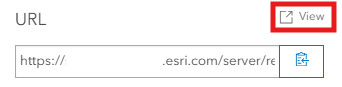
- Scroll down to the REST URL of the item.
- Press View to open it.
- After the page opens, click the URL between rest/sharing/, and add admin and a forward slash (/) before and after as needed. This is shown in the image below:
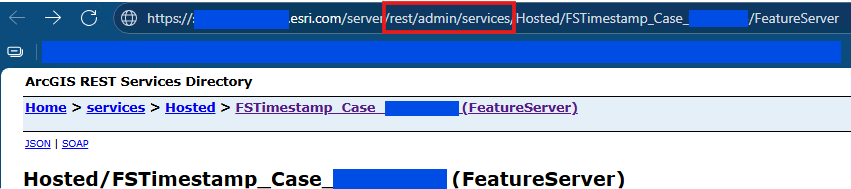
- After accessing the link, the admin endpoint of the REST API is available.

Note:
This method works for both ArcGIS Online and Enterprise.
Article ID: 000038418
- ArcGIS Online
- ArcGIS Enterprise
Get support with AI
Resolve your issue quickly with the Esri Support AI Chatbot.


Related Information
Discover more on this topic

Search for related information

Find training related to this topic

Explore ideas and give feedback
Get help from ArcGIS experts
Start chatting now