
HOW TO
Apply a geographic (datum) transformation in ArcMap
Summary
ArcMap automatically projects data layers to the data frame's coordinate system. This is called 'project-on-the-fly'. However, if the Geographic Coordinate Systems (GCS) are not the same, a geographic (datum) transformation must be applied by the user to the ArcMap data frame. This is in addition to the operation performed with project-on-the-fly, which temporarily converts coordinate values from the projection definition of the data to the coordinate system applied to the ArcMap data frame.
The geographic (datum) transformation cannot be automatically applied because many geographic coordinate systems and transformations exist for a given area. Geographic transformations use different methods, with different accuracies, and are defined for particular areas. This document discusses how to manually apply a geographic transformation to the ArcMap data frame.
Procedure
- In ArcMap, go to View > Data Frame Properties dialog.
- Select the Coordinate System tab.
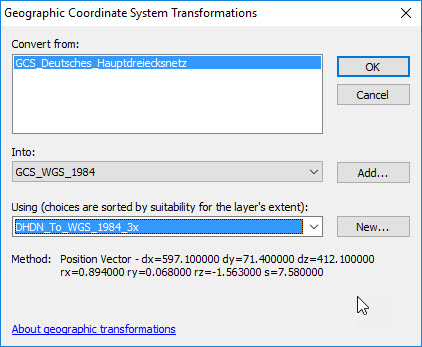
- Click the Transformations button at the bottom of the dialog (in older versions of the software, the Transformations button appears on the right.) The Geographic Coordinate Systems Transformations dialog box appears.
-
- The Convert from section lists the geographic coordinate systems of the layers. The Into listbox displays the Geographic Coordinate System of the ArcMap data frame.
Warning:
Do not change the value in the 'Into' box in this dialog.
-
- The Using drop-down lists any predefined transformation between the two systems.
Note:
It is okay if the transformation name goes in the opposite direction. ArcMap applies the transformation in either direction with equal accuracy.
- Select one of the listed transformations.
Warning:
Only one transformation can be selected in this dialog.
- To determine the correct geographic transformation to use for the area of interest, click the link in the Related Information section below to "Select the correct geographic (datum) transformation when projecting between datums".
Article ID:000002828
- ArcMap
Get help from ArcGIS experts
Download the Esri Support App
Related Information
Discover more on this topic

Search for related information

Find training related to this topic

Explore ideas and give feedback