
操作方法
操作方法:在 Map Viewer 中使用 ArcGIS Arcade 以百分比范围设置要素图层的标注或样式
摘要
在 ArcGIS Online 和 Portal for ArcGIS Map Viewer 中,使用百分比范围来设置要素图层中数值数据的样式或标注有助于更好地管理数据。 在本文中,将使用 Arcade 表达式以所需百分比范围来创建标注或设置要素图层的样式。
过程
使用标注显示百分比范围
- 在 Map Viewer 中打开 web 地图并选择要素图层。
- 在设置(浅色)工具栏上,单击标注
 。 通过切换打开启用标注来启用标注。
 - 在标注要素窗格中,单击添加标注分类。 在标注字段下,单击使用表达式
 。
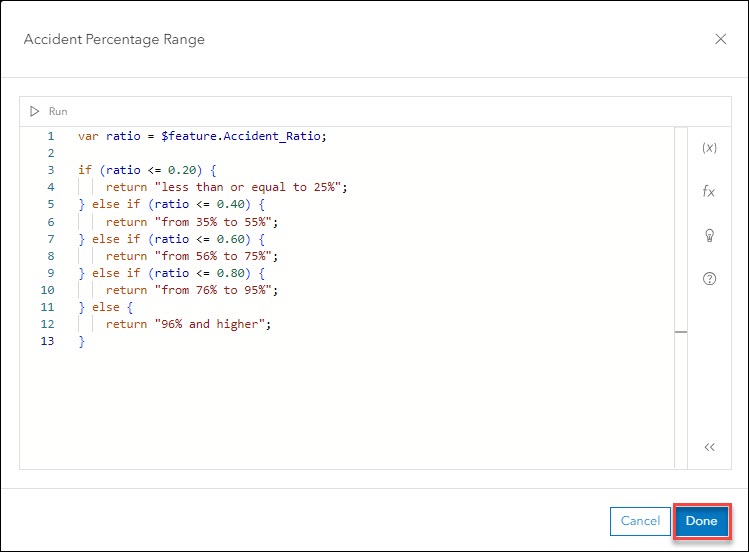
。 - 在编辑器窗口中,配置以下表达式。
- 将 <variable_name> 替换为所需变量名称。 在本示例中,将使用“ratio”。
- 将 <field_name> 替换为字段的名称以使用标注显示百分比范围。 在本示例中,将选择“Accident_Ratio”。
- 将 <field_value> 替换为属性表中所需字段的值。
- 将 <百分比范围> 替换为所需标注文本。
var <variable_name> = $feature.<field_name>

if (<variable_name> <=<field_value>) {
    return "<range of percentage>";
} else if (<variable_name> <=<field_value> ) {
    return "<range of percentage>";
} else if (<variable_name> <=<field_value> ) {
    return "<range of percentage>";
} else {
    return "<range of percentage>";
}
Note:
The numbers for the range can be specified as per the requirements of the field’s attribute value.
- 单击完成。
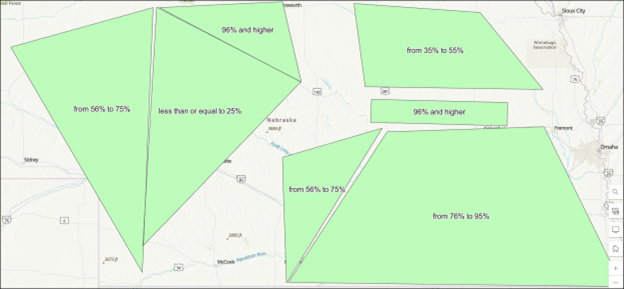
以下 web 地图显示了使用标注显示的字段的百分比范围。
使用唯一符号显示百分比范围
- 在 Map Viewer 中打开 web 地图并选择要素图层。
- 在设置(浅色)工具栏中,单击样式
 。
。 - 在样式窗格中,对于选择属性,单击表达式。
- 在编辑器窗口中,配置以下表达式。
- 将 <variable_name> 替换为所需变量名称。 在本示例中,将使用“ratio”。
- 将 <field_name> 替换为字段的名称以显示百分比范围。 在本示例中,将选择“Accident_Ratio”。
- 将 <field_value> 替换为属性表中所需字段的值。
- 将 <百分比范围> 替换为所需图例文本。
var <variable_name> = $feature.<field_name>

if (<variable_name> <=<field_value>) {
    return "<range of percentage>";
} else if (<variable_name> <=<field_value> ) {
    return "<range of percentage>";
} else if (<variable_name> <=<field_value> ) {
    return "<range of percentage>";
} else {
    return "<range of percentage>";
}
Note:
The numbers for the range can be specified as per the requirements of the field’s attribute value.
- 单击完成。
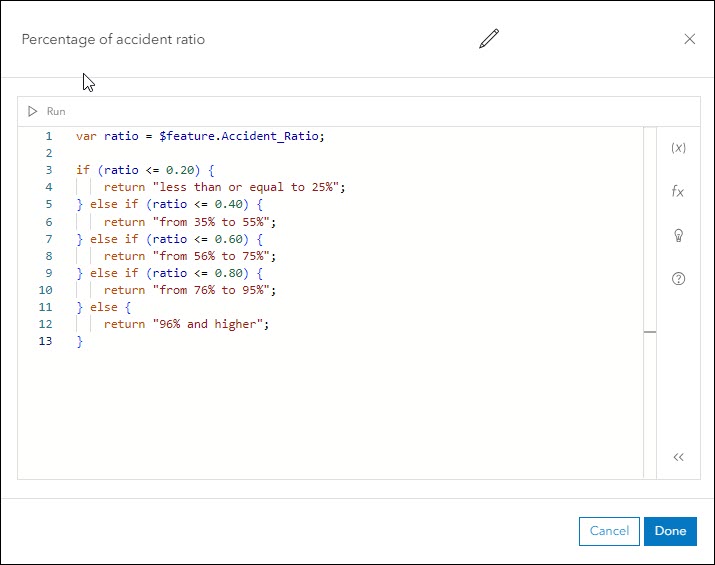
- 在样式窗格中,对于选取样式,选择类型(唯一符号)。
- 在样式窗格中,单击完成。
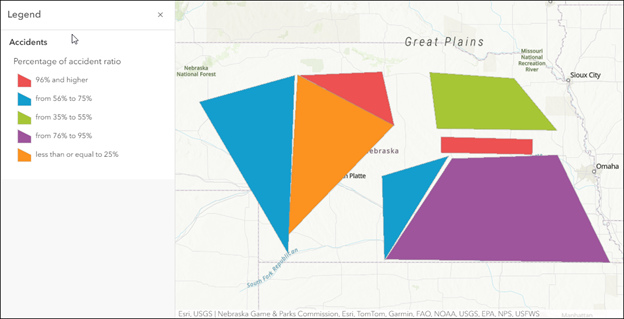
- 显示表示字段值百分比范围的图例。 有关说明,请参阅 ArcGIS Online:查看图例 (Map Viewer) 或 Portal for ArcGIS:查看图例 (Map Viewer)。
以下 web 地图显示了通过图例中的唯一符号表示的百分比范围。
文章 ID: 000032559
获得人工智能支持
使用 Esri Support AI Chatbot 快速解决您的问题。


相关信息
发现关于本主题的更多内容

Search for related information

Find training related to this topic

Explore ideas and give feedback
获取来自 ArcGIS 专家的帮助
立即开始聊天