
操作方法
操作方法:按许可类型创建自定义 ArcGIS Pro 快捷方式
描述
借助自定义批处理文件,可以灵活启动不同许可类型和许可级别的 ArcGIS Pro。 这在浮动版许可和单机版许可环境中都非常有用,在这些环境中,用户可能需要根据任务要求切换许可。 本文提供了根据许可类型和许可级别为 ArcGIS Pro 创建自定义批处理文件的工作流。
解决方案或解决方法
Note:
Ensure all license types and license levels are authorized on the machine before following the workflow provided.
- 在计算机上,使用诸如 Notepad 等文本编辑器创建一个新的文本文件。
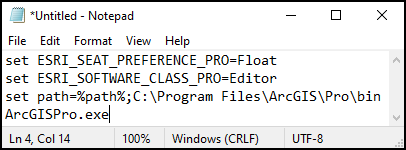
- 在文本文件中,输入以下脚本:
set ESRI_SEAT_PREFERENCE_PRO=<license_type>
set ESRI_SOFTWARE_CLASS_PRO=<license_level>
set path=%path%;C:\Program Files\ArcGIS\Pro\bin
ArcGISPro.exe
- 对于 <license_type> 变量,指定:
- 对于浮动版许可,指定 Float。
- 对于单机版许可,指定 Fixed。
- 对于 <license_level> 变量,指定:
- 对于 Basic 许可类型,指定 Viewer。
- 对于 Standard 许可类型,指定 Editor。
- 对于 Advance 许可类型,指定 Professional。
Note:
For the 'set path' parameter, the default path for the ArcGIS Pro.exe file is used in this script. Specify the path appropriately if this path is changed during the installation process.
下图显示了针对本文使用的脚本。 对于浮动版许可,指定 Float;对于 Standard 许可类型,指定 Editor。
- 将该脚本另存为批处理文件。
- 在文本文件上,单击文件,然后单击另存为...。
- 在另存为窗口中,指定文件的名称,并在名称末尾键入 .bat。
- 在另存为类型下拉菜单中,选择所有文件,然后单击保存。
- 为批处理文件创建快捷方式和自定义快捷方式图标。
- 右键单击批处理文件图标,然后选择创建快捷方式。
- 右键单击快捷方式,然后选择属性。
- 单击快捷方式选项卡,然后选择更改图标...。
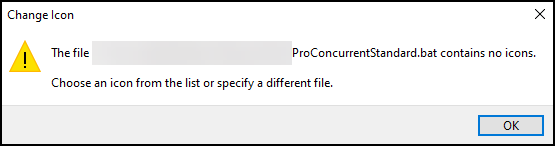
- 当返回警告消息:“文件 <.bat 文件目录> 不包含任何图标。 请从列表中选择图标或者指定其他文件”时,单击确定。
- 在更改图标窗口中,选择图标并单击确定。
- 在快捷方式属性窗口中,单击应用和确定。
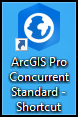
下图显示了为具有浮动版许可类型和 Standard 许可级别的 ArcGIS Pro 创建的快捷方式。
文章 ID: 000031505
获得人工智能支持
使用 Esri Support AI Chatbot 快速解决您的问题。


相关信息
发现关于本主题的更多内容

Search for related information

Find training related to this topic

Explore ideas and give feedback
获取来自 ArcGIS 专家的帮助
立即开始聊天