
操作方法
常见问题解答:为什么在 ArcGIS Pro 中 KML 属性不会自动填充到属性字段?
在 ArcGIS Pro 中,使用 KML 转图层工具导入 Keyhole 标记语言 (KML) 文件时,由于存储表格信息所用的格式不同,输出图层的属性不会自动填充到其各自的属性字段中。 由于 KML 是一种基于标签的文件格式,因此表格信息在 <ExtendedData> 标签内表示。 此标签包含一个或多个 <Data> 标签,用于表示与地理要素关联的特定属性。
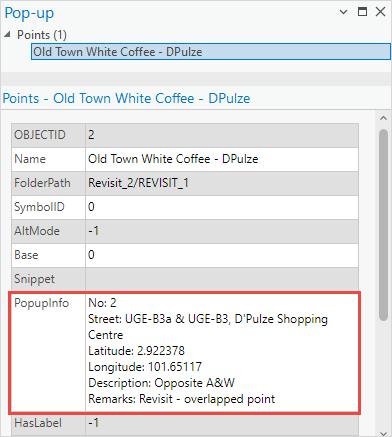
ArcGIS Pro 以结构化的表格格式存储要素属性,其中列或字段表示不同的属性。 因此,在使用“KML 转图层”工具时,ArcGIS Pro 会创建一个 PopupInfo 字段,其中包含在 KML 弹出窗口中显示的、基于 HTML 标记的可见信息。
下图显示了在 ArcGIS Pro 中选择要素时弹出窗口中显示的属性信息。
但是,用户可以使用 ArcGIS Data Interoperability 扩展模块和许可提供的快速导入工具来保留 KML 文件的属性字段,或手动将 KML 属性填充到其各自的字段中。
使用 ArcGIS Data Interoperability 扩展模块的“快速导入”工具
Note:
If the KML file is missing its schema, the attribute fields of the layer are not populated in the attribute table.
- 打开 ArcGIS Pro 工程。
- 在 ArcGIS Pro 的分析选项卡上,单击地理处理组中的工具。
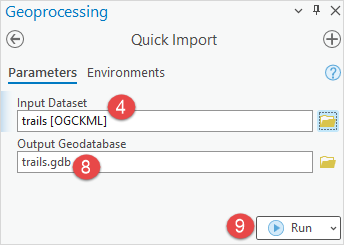
- 在地理处理窗格中,搜索并单击快速导入工具。
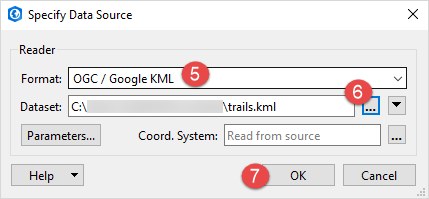
- 在参数选项卡上,对于输入数据集,单击浏览
 。
。 - 在指定数据源对话框中,从格式下拉列表中搜索并选择 OGC/Google KML。
Note:
Optionally, click More Formats…, search for and select OGC/Google KML from the format list in the FME Reader Gallery dialog box, and click OK.
- 对于数据集,单击打开文件浏览器
 ,然后从选择“文件”对话框中选择 KML 文件。
 - 单击确定。
- 在快速导入窗格中,为输出地理数据库提供名称,然后单击浏览
 以指定文件地理数据库的位置。
 - 单击运行。
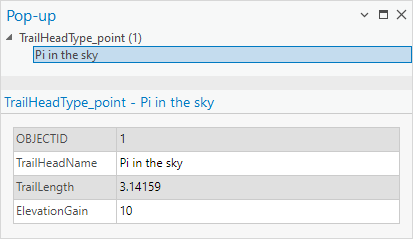
下图显示了使用“快速导入”工具时自动填充到其各自字段中的属性。
手动将转换后的 KML 图层属性填充到其在属性表中各自的字段中
Note:
This workaround is applicable for smaller datasets. Manually populating larger datasets consumes time.
- 打开 ArcGIS Pro 工程。
- 在内容窗格中,右键单击 KML 图层,然后单击属性表。
- 创建新字段以填充 KML 属性信息。
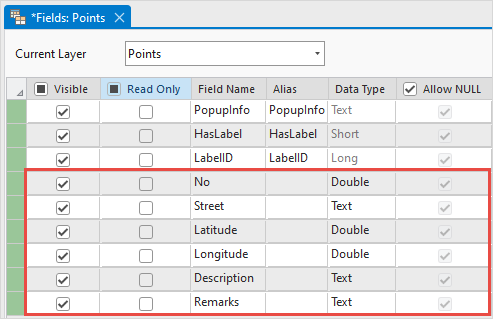
- 手动将 KML 属性填充到其各自的字段中。

Note:
In the attribute table, delete or hide other fields if necessary.
文章 ID: 000032102
获得人工智能支持
使用 Esri Support AI Chatbot 快速解决您的问题。


相关信息
发现关于本主题的更多内容

Search for related information

Find training related to this topic

Explore ideas and give feedback
获取来自 ArcGIS 专家的帮助
立即开始聊天