
常见问题
常见问题解答:是否可在 ArcGIS Web AppBuilder 中停靠弹出窗口?
无法在 ArcGIS Web AppBuilder 中停靠弹出窗口。 这是一个已知限制。 默认情况下,弹出窗口将显示在所选要素旁边。 ArcGIS Web AppBuilder(开发人员版)中可能提供此功能。 但是,Esri 建议用户迁移至 ArcGIS Experience Builder,因为 ArcGIS Web AppBuilder 将于 2025 年 7 月停用,而开发人员版将于 2024 年 7 月停用,这与 ArcGIS API for JavaScript 3.x 版本的停用同步。 有关详细信息,请参阅 ArcGIS Web AppBuilder:什么是 ArcGIS Web AppBuilder?和 ArcGIS 博客:ArcGIS Web AppBuilder 停用计划。
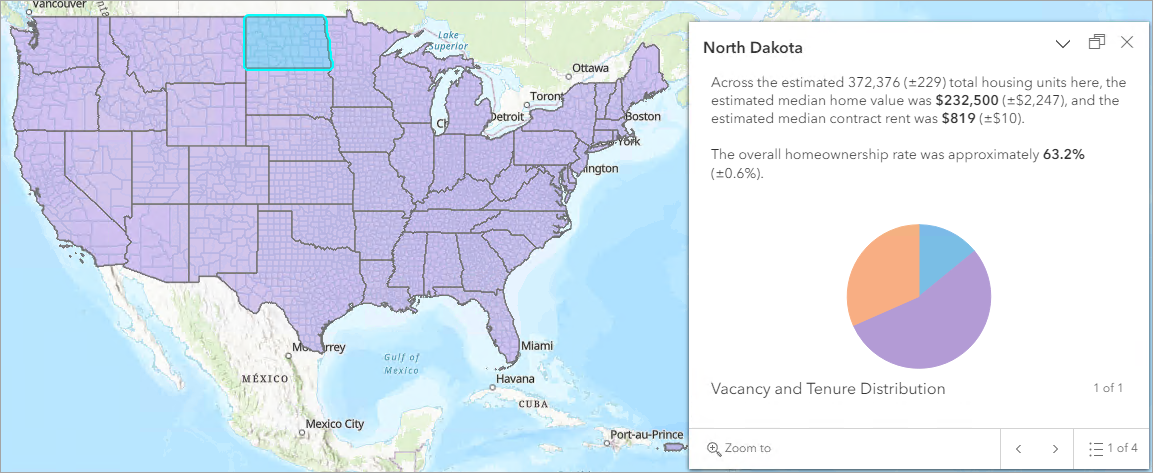
本文提供了使用 ArcGIS Experience Builder 和 ArcGIS Instant Apps 来停靠弹出窗口的示例和说明。
Note:
An alternative is to add the web map to the web experience in ArcGIS Experience Builder or web app in ArcGIS Instant Apps and click any feature on the map. Click the Dock icon in the pop-up window.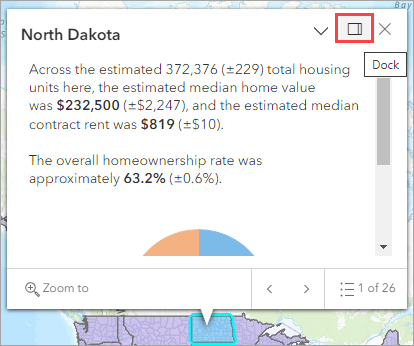
应用相关工作流以将弹出窗口停靠在所需位置。
对于 ArcGIS Experience Builder
Note:
Only one layer at a time can be linked as the data source in the Feature Info widget.
- 登录到 Portal for ArcGIS 或 ArcGIS Online,然后使用首选模板根据现有 web 地图创建 web 体验。 在本示例中,将使用 Blank fullscreen 模板。
- 单击画布上的地图以打开“地图”面板。
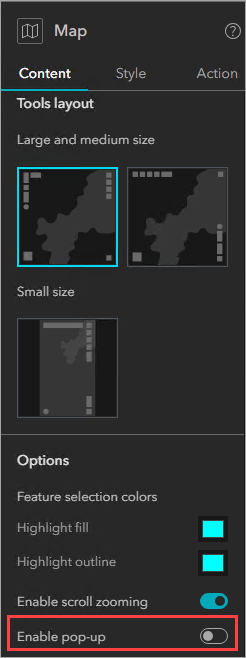
- 在内容选项卡中,导航至启用弹出窗口并将其关闭。
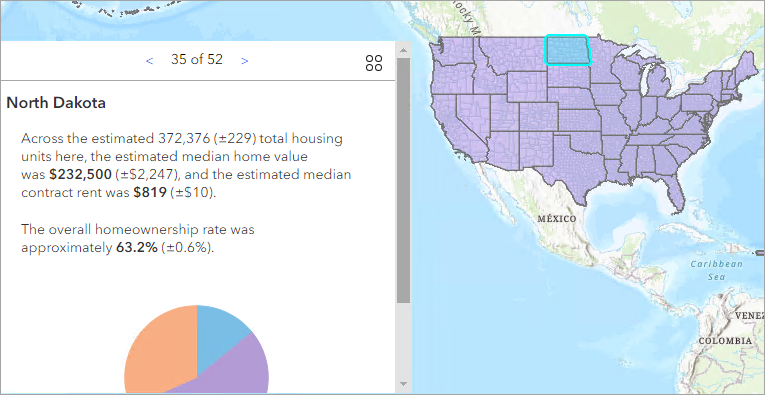
- 在插入微件面板上,将要素信息微件拖放至画布上的首选位置。
- 在要素信息面板上,配置所需设置。
- 单击选择数据并添加数据源。
- 在详细信息选项下,选中要在“要素信息”窗口中显示的详细信息。
- 在样式下,选择样式选项。 在本示例中,将选择遵循源。 如有必要,请配置样式和操作设置。
- 保存并发布 Web 体验。
对于 ArcGIS Instant Apps
- 登录到 Portal for ArcGIS 或 ArcGIS Online,然后使用首选模板创建 Instant App。 有关详细信息,请参阅 ArcGIS Instant Apps:选择应用程序模板。 在本示例中,将使用 Basic 模板。
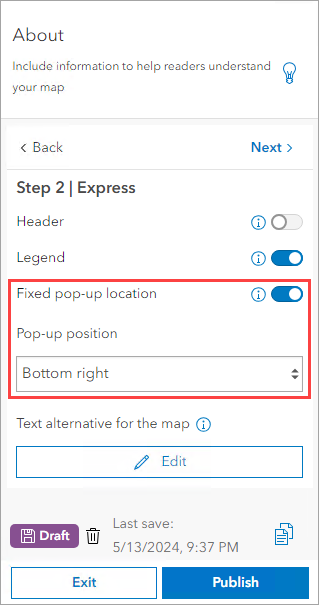
- 单击 Step 2 | Express,然后切换打开固定弹出窗口位置。
- 在弹出窗口位置下,选择显示弹出窗口的首选位置。 在本示例中,将选择 Bottom right。
- 单击发布。
Note:
Other ArcGIS Instant Apps templates such as the Media Map or Sidebar templates can also be utilized to dock the pop-up window or display it on the side panel.
文章 ID: 000032649
获得人工智能支持
使用 Esri Support AI Chatbot 快速解决您的问题。


相关信息
发现关于本主题的更多内容

Search for related information

Find training related to this topic

Explore ideas and give feedback
获取来自 ArcGIS 专家的帮助
立即开始聊天