
操作方法
错误:ArcGIS Pro:代码 500 保留剩余连接槽,以用于非复制超级用户连接
描述
ArcGIS Pro 允许通过 Portal for ArcGIS 从 ArcGIS Enterprise 添加服务。 在某些情况下,将服务从 ArcGIS Enterprise 添加到 ArcGIS Pro 会失败,并返回以下错误消息:
Error:
code:500, FATAL: remaining connection slots are reserved for non-replication superuser connections, Internal server error.
在 ArcGIS Pro 中,此错误消息可能会与另一个错误消息一起显示,即“错误:无法添加数据:<服务 URL>”。
原因
已达到允许与关系数据存储建立的最大连接数。 连接限制还包括 ArcGIS Data Store 内部进程,最多需要 5 个连接。
解决方案或解决方法
按照以下工作流解决错误消息并将服务从 ArcGIS Enterprise 添加到 ArcGIS Pro。
Note:
On the ArcGIS Data Store machine, run the describedatastore command utility to check the maximum number of connections allowed to the relational data store. Refer to ArcGIS Enterprise: ArcGIS Data Store command utility reference for more information.
- 在 ArcGIS Data Store 计算机上,运行 changedbproperties 命令实用程序增加允许与关系数据存储建立的最大连接数。
Note:
Ensure the machine has enough resources before increasing the maximum number of connections allowed in ArcGIS Data Store. Refer to ArcGIS Enterprise: ArcGIS Data Store 11.4 system requirements and the '--max-connections' configuration option under the changedbproperties section for additional information.
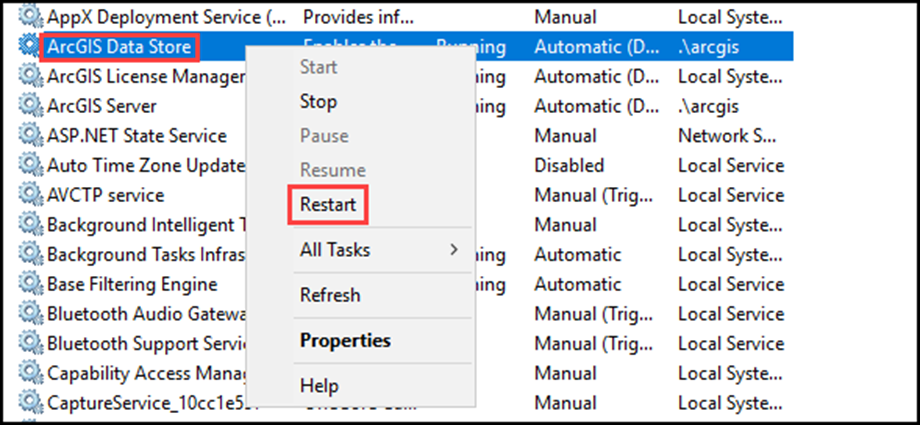
- 重新启动 ArcGIS Data Store 服务。
- 在任务栏搜索框中键入服务,然后按 Enter 键。
- 单击结果中的服务选项打开控制台。
- 右键单击 ArcGIS Data Store 服务,然后从下拉列表中选择重新启动选项。
文章 ID: 000028912
获得人工智能支持
使用 Esri Support AI Chatbot 快速解决您的问题。


相关信息
发现关于本主题的更多内容

Search for related information

Find training related to this topic

Explore ideas and give feedback
获取来自 ArcGIS 专家的帮助
立即开始聊天