
操作方法
错误:ArcGIS for Power BI:无法显示此视觉对象
描述
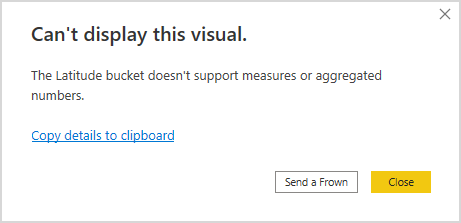
在 ArcGIS for Power BI 中,尝试加载包含纬度和经度的电子表格时,返回以下错误:
Error:
Can't display this visual.
The Latitude bucket doesn't support measures or aggregated numbers.
原因
- ArcGIS for Power BI URL 在 ArcGIS Enterprise 中被阻止。
- ArcGIS for Power BI URL 被组织的跨域资源共享 (CORS) 策略阻止。
解决方案或解决方法
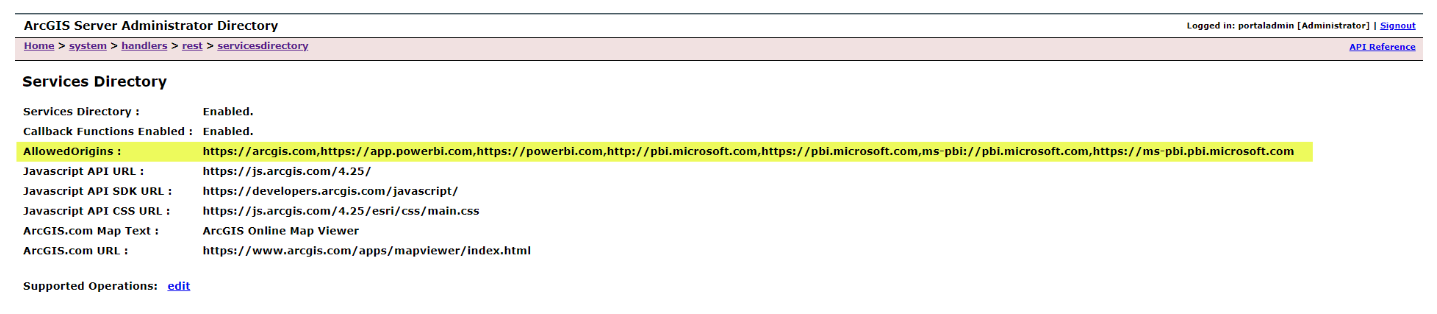
在 ArcGIS Enterprise 中添加 ArcGIS for Power BI URL
在 Portal for ArcGIS 和 ArcGIS Server 中创建例外。 有关进一步说明,请参阅 ArcGIS for Microsoft 365:配置 ArcGIS Enterprise 跨域资源共享 。
在组织的跨域资源共享 (CORS) 策略中创建例外
请联系 IT 部门,在组织中创建 URL 例外。 有关 URL 例外,请参阅 ArcGIS for Microsoft 365:ArcGIS for Power BI 安全网络。
Note:
ArcGIS Online has certain domain requirements that must also be met. Suppose an organization decides to leverage its enterprise deployments with features like geocoding, ArcGIS Living Atlas, basemaps, imagery, demographics, infrastructure, and environmental data. In that case, ensure the network can access these additional domains.
If an organization's security policy disallows wildcards, refer to PDF: Domain Requirements for ArcGIS Online. Note that users must be signed in with an organizational account to view either of these documents, as they are located in the secure document section of the ArcGIS Trust Center https://trust.arcgis.com/.
文章 ID: 000032440
获得人工智能支持
使用 Esri Support AI Chatbot 快速解决您的问题。


相关信息
发现关于本主题的更多内容

Search for related information

Find training related to this topic

Explore ideas and give feedback
获取来自 ArcGIS 专家的帮助
立即开始聊天