
操作方法
问题:在进行打印或导出时,数据框轮廓或图形框/线消失
描述
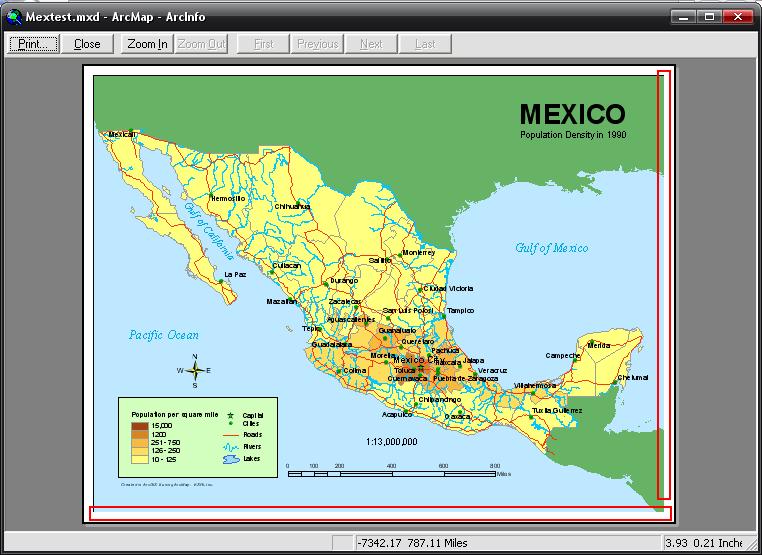
如果数据框轮廓或图形框/线放置得太靠近或直接放置在打印机所需的最小页边距处,则在打印或导出时会消失。
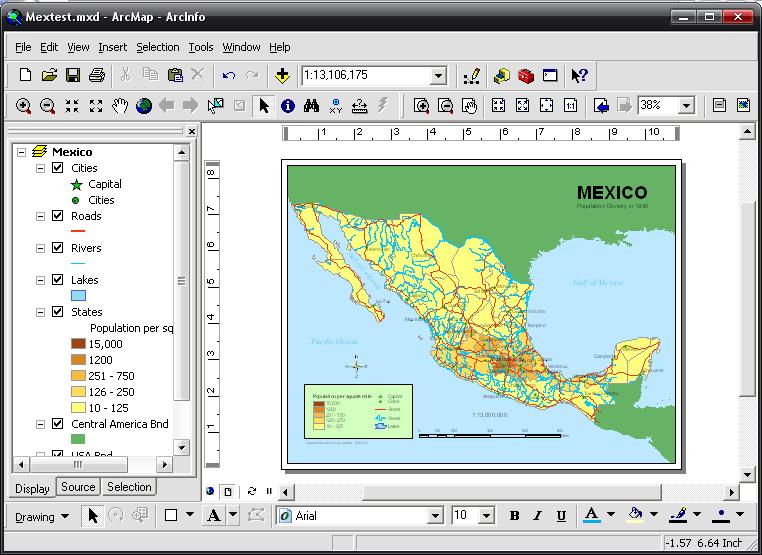
例如,在“布局”中查看时,地图显示正确:
但会在“打印预览”中被裁剪,并且很可能打印时也会被裁剪:
原因
这是一个已知问题,它源于 ArcGIS 使用的图形显示管线(Microsoft 图形设备接口(GDI))所存在的舍入误差。
解决方案或解决方法
不要将图形放置得太靠近或直接放置在打印机所需的最小页边距处。 如果图形放置得太靠近或直接放置在打印机所需的最小页边距处,则可能会裁剪掉一个或多个像素。
请注意:强烈建议您使用 ArcGIS Pro 进行打印和导出,特别是在遇到由 ArcMap 显示引擎的局限性引起的问题时。 更具体地说,对于一些用户在 ArcMap 中遇到的图形设备接口 (GDI) 限制,ArcGIS Pro 不受此限制影响。 例如,ArcGIS Pro 中本来支持透明度,以防止图层栅格化。 此外,ArcGIS Pro 还支持布局元素中的透明度。
Note:
ArcGIS Pro does not support exporting directly to AI (Adobe Illustrator) files as it is a closed file format.
It is recommended to export to the AIX format and use the ArcGIS Maps For Adobe Creative Cloud extension in Adobe Illustrator to open the exported AIX files.
For more information on the subtle differences between ArcMap and ArcGIS Pro in drawing, please see the help topic: Visual differences in imported map documents
文章 ID: 000009980
获得人工智能支持
使用 Esri Support AI Chatbot 快速解决您的问题。


发现关于本主题的更多内容

Search for related information

Find training related to this topic

Explore ideas and give feedback
获取来自 ArcGIS 专家的帮助
立即开始聊天