
よくあるご質問 (FAQ)
ArcGIS Pro では、カートグラフィック リプレゼンテーションはサポートされていますか?
Refer to the screenshot below.
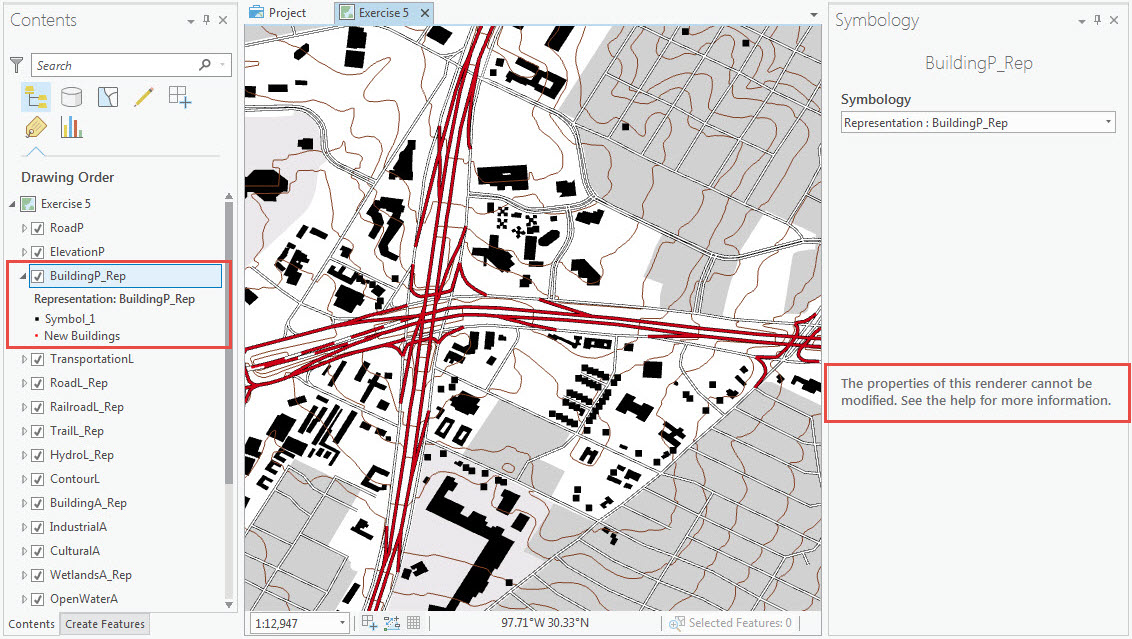
For more information, refer to the following document: Tools that are not available in ArcGIS Pro
Note:
Do not add a feature class with cartographic representation directly from a geodatabase to ArcGIS Pro as the representations do not display. Save the feature class with representations as an MXD file, and import the map document to ArcGIS Pro.
記事 ID: 000015363
AI によるサポートを受ける
Esri サポート AI チャットボットを使用して問題を迅速に解決します。


関連情報
このトピックについてさらに調べる

Search for related information

Find training related to this topic

Explore ideas and give feedback
ArcGIS エキスパートのサポートを受ける
今すぐチャットを開始