
Preguntas frecuentes
¿Por qué no se muestran los resultados de geocodificación del Localizador de direcciones de punto de StreetMap Premium en el edificio ni en la parcela?
Geocoded address points display along the street, rather than on the building, because the StreetMap Premium point locators default to show the location of a matched address as the entry point on the street to the parcel or building centroid. The geocoding result contains fields named 'DisplayX' and 'DisplayY'; these fields store the decimal degree coordinates for the parcel or building centroid associated with each address as the geocoded point feature is located on the street segment near the main entrance to the property.
All StreetMap Premium PointAddress locators provide the ability to change the default location of a matched address from the entry point on the street to the parcel or building centroid, though the results may not show the change. Whether the point address locates on the parcel depends on whether the reference data includes the exact parcel location. Reference data sources vary by country, so some countries may have the exact parcel location and others may not.
To make the change to get the exact parcel location, follow these steps.
In ArcMap:
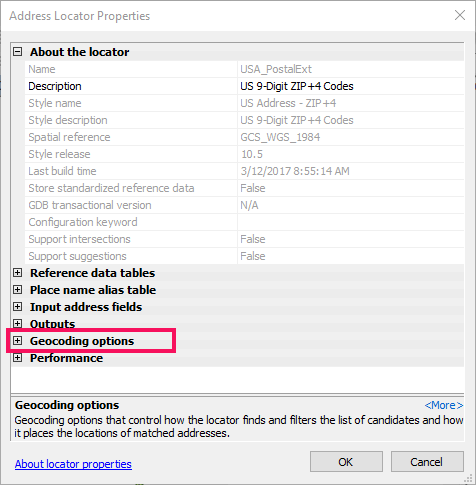
- In ArcCatalog or the Catalog window in ArcMap, right-click the locator and select Properties.
- Expand the Geocoding options section.
- Click the No next to Derive output geometry from display fields and change it to Yes.
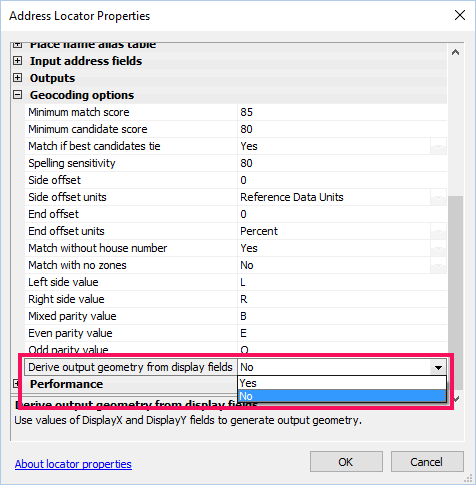
- Click OK.
Note:
After making a change to the locator settings, you will need to remove and read the locator to the map in order for the changes to take effect.
In ArcGIS Pro:
- Add the locator to the project.
- Expand the Locator section in the Catalog pane.
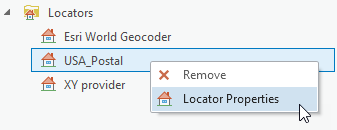
- Right-click the locator and select Locator Properties.
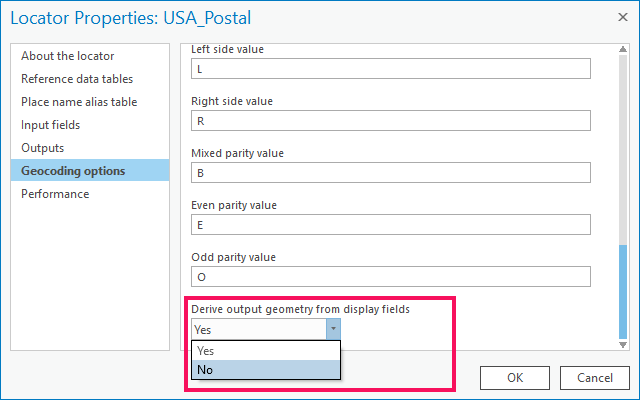
- In the Geocoding Options tab, change the Derive output geometry from display fields drop-down to Yes.
Id. de artículo: 000001067
Obtenga soporte con IA
Resuelva su problema rápidamente con el chatbot de inteligencia artificial de soporte de Esri.


Información relacionada
Descubrir más sobre este tema

Search for related information

Find training related to this topic

Explore ideas and give feedback
Obtener ayuda de expertos en ArcGIS
Empieza a chatear ahora