
CÓMO
Dividir entidades de polilínea en los puntos de intersección con los límites de los polígonos en ArcGIS Pro
Resumen
This article describes two methods to split lines intersecting polygon boundaries. The first option splits lines at polygon boundaries while retaining all the lines and geometry of the original feature class. The second option only includes split line segments overlapping the polygons.
Procedimiento
Note:
These tools require an Advanced ArcGIS Pro license.
Split lines at intersecting points
- Identify the points where the polygon boundaries intersect the lines using the Intersect tool.
- In ArcGIS Pro, navigate to Analysis > Tools.
- In the Geoprocessing pane, search for the Intersect tool.

- Under Parameters, select the line and polygon layers for Input Features, and specify the location for the Output Feature Class.
- For Output Type, select Point. Click Run.
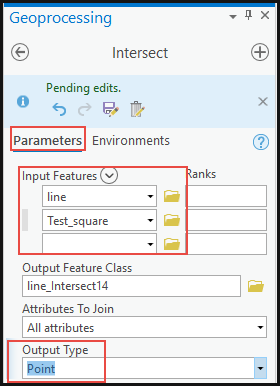
- Split the lines at the intersecting points using the Split Line at Point tool.
- In the Geoprocessing pane, search for the Split Line at Point tool.
- Under Parameters, select the line layer for Input Features.
- For Point Features, select Intersect from the drop-down list.
- Specify the new layer name and location for the Output Feature Class.
- For this example, use 0.1 Meters for Search Radius. Click Run.

Split the lines outside the polygon boundaries using the Intersect tool
Note:
Use this method if there is no Advanced license in ArcGIS Pro.
- In ArcGIS Pro, navigate to Analysis > Tools.
- In the Geoprocessing pane, search for the Intersect tool.
- Under Parameters, select the polygon and line layers for Input Features, and specify the location for the Output Feature Class.
- For Output Type, select Line. Click Run.
The following image shows the split lines outside the polygon boundary and only the line overlapping the polygon intact.

Note:
For this method, the lines outside the polygon boundaries are not included in the output.
Id. de artículo: 000026247
Obtenga soporte con IA
Resuelva su problema rápidamente con el chatbot de inteligencia artificial de soporte de Esri.


Información relacionada
Descubrir más sobre este tema

Search for related information

Find training related to this topic

Explore ideas and give feedback
Obtener ayuda de expertos en ArcGIS
Empieza a chatear ahora