
CÓMO
Eliminar rastreos de la capa de uso compartido de ubicaciones con la API REST de ArcGIS
Descripción
Note:
The functionalities of ArcGIS Collector, ArcGIS Explorer, and ArcGIS Tracker are now available in ArcGIS Field Maps. There are no new capabilities planned for these apps—all future updates will be focused on Field Maps. Migration is recommended. See ArcGIS Blog: Migrate to Field Maps for more information.
ArcGIS Tracker se utiliza para rastrear el movimiento de los usuarios móviles. En ocasiones, las ubicaciones se eliminan para restablecer el movimiento de los usuarios o eliminar recorridos innecesarios del registro. Sin embargo, las capas de uso compartido de ubicación no indican la capacidad Eliminar entidades en la definición de la capa de entidades. En ArcGIS Online, se logra a través de la API REST de ArcGIS utilizando la operación Eliminar entidades. En este artículo se muestra el flujo de trabajo para eliminar rastreos de la capa de uso compartido de ubicación mediante la operación Eliminar entidades en la API REST de ArcGIS.
Solución o solución alternativa
Note:
The ability to delete tracks is restricted to administrators.
Note:
Deleting individual tracks directly is not supported in ArcGIS Online. Performing the following workflow deletes the user's tracks entirely.
Note:
Esri recommends creating a backup of the data by exporting the location sharing layer as a shapefile or CSV file before deleting the track views. Refer to ArcGIS Online: Export data from hosted feature layers for further instructions.
- Inicie sesión en ArcGIS Online y haga clic en Grupos > Mis grupos.
- Busque y haga clic en el grupo del uso compartido de recorrido.
- En Contenido agregado recientemente o Contenido del grupo destacado, vaya a la capa de entidades alojada y haga clic en ella.
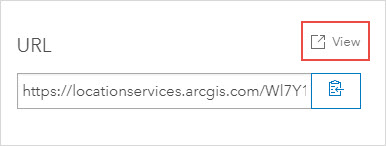
- En la página de detalles del elemento, desplácese hasta la parte inferior de la página. En la sección URL, haga clic en Ver.
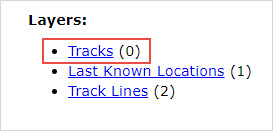
- En el Directorio de servicios REST de ArcGIS, en Capas, haga clic con el botón derecho en Rastreos y seleccione Abrir vínculo en una nueva pestaña.
- En la dirección URL de la nueva pestaña generada, inserte /deleteFeatures/ entre "0" y la sección "?token". La siguiente imagen muestra el parámetro deleteFeatures incorporado a la URL.

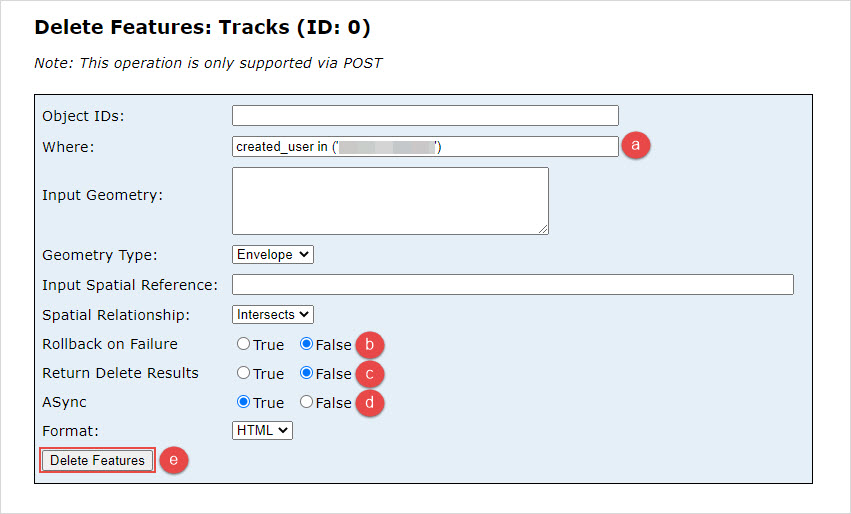
- En la página Eliminar entidades: Recorridos (Id.: 0), configure la operación Eliminar entidades.
- En Dónde, escriba created_user in ('<username>').
Note:
For more information on the clauses used in this workflow, refer to ArcGIS Online: Deleting tracks.
- En Reversión en caso de error, haga clic en False.
- En Devolver resultados de eliminación, haga clic en False.
- En ASync, haga clic en True.
- Haga clic en Eliminar entidades.
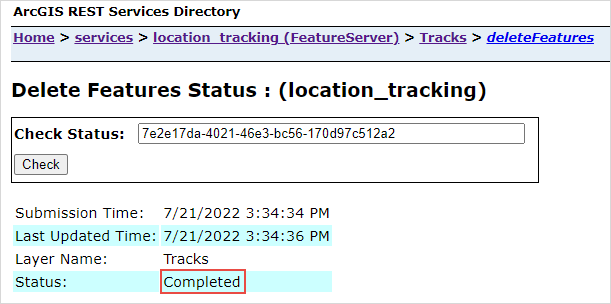
- Haga clic en el vínculo de statusURL.

Cuando se devuelve "Completado" en Estado, los rastreos se eliminan de la capa de uso compartido de ubicación.
Id. de artículo: 000028200
Obtenga soporte con IA
Resuelva su problema rápidamente con el chatbot de inteligencia artificial de soporte de Esri.


Información relacionada
Descubrir más sobre este tema

Search for related information

Find training related to this topic

Explore ideas and give feedback
Obtener ayuda de expertos en ArcGIS
Empieza a chatear ahora