
CÓMO
ArcGIS Pro: Las ranuras de conexión restantes de Código 500 están reservadas para conexiones de superusuario sin replicación
Descripción
ArcGIS Pro permite agregar servicios desde ArcGIS Enterprise a través de Portal for ArcGIS. En algunos casos, se produce un error al agregar un servicio de ArcGIS Enterprise a ArcGIS Pro y se devuelve el siguiente mensaje de error:
Error:
code:500, FATAL: remaining connection slots are reserved for non-replication superuser connections, Internal server error.
Este mensaje de error puede aparecer junto con otro mensaje de error, "Error: No se pudieron agregar datos: <Service URL>", en ArcGIS Pro.
Causa
Se ha alcanzado el número máximo de conexiones permitidas al almacén de datos relacional. El límite de conexión también incluye los procesos internos de ArcGIS Data Store, que requieren hasta cinco conexiones.
Solución o solución alternativa
Utilice el siguiente flujo de trabajo para resolver el mensaje de error y agregar los servicios de ArcGIS Enterprise a ArcGIS Pro.
Note:
On the ArcGIS Data Store machine, run the describedatastore command utility to check the maximum number of connections allowed to the relational data store. Refer to ArcGIS Enterprise: ArcGIS Data Store command utility reference for more information.
- En el equipo de ArcGIS Data Store, ejecute la utilidad de comando changedbproperties para aumentar el número máximo de conexiones permitidas al data store relacional.
Note:
Ensure the machine has enough resources before increasing the maximum number of connections allowed in ArcGIS Data Store. Refer to ArcGIS Enterprise: ArcGIS Data Store 11.4 system requirements and the '--max-connections' configuration option under the changedbproperties section for additional information.
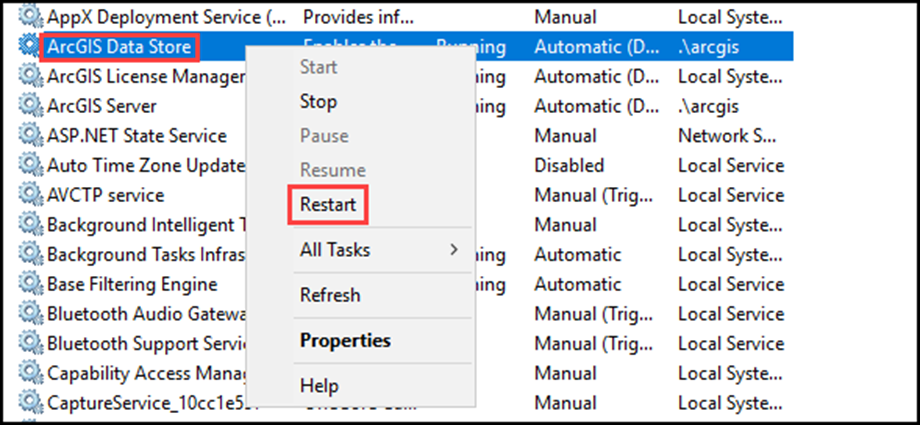
- Reinicie el servicio de ArcGIS Data Store.
- Escriba Servicios en el cuadro de búsqueda de la barra de tareas y pulse Intro.
- Haga clic en la opción Servicios de los resultados para abrir la consola.
- Haga clic con el botón derecho en el servicio ArcGIS Data Store y seleccione la opción Reiniciar en la lista desplegable.
Id. de artículo: 000028912
Obtenga soporte con IA
Resuelva su problema rápidamente con el chatbot de inteligencia artificial de soporte de Esri.


Información relacionada
Descubrir más sobre este tema

Search for related information

Find training related to this topic

Explore ideas and give feedback
Obtener ayuda de expertos en ArcGIS
Empieza a chatear ahora