
Frequently asked question
Why aren’t my relational data store backups being deleted after the specified retain day limit?
Relational data store backups are only deleted after the full retention period has passed. Additionally, the system ensures that at least one healthy backup is always available. If the most recent backup failed or is incomplete, the system will preserve the last successful backup, even if it exceeds the retention limit, which is a built-in safeguard to prevent against data loss.
By default, the ArcGIS Data Store relational store has a backup created every four days, with the backup retention period set to seven days. This means if you keep the default backup frequency (every four days) and retention schedules (seven days), the backup directory could contain up to three full backups.
If your organization members publish and edit large numbers of hosted feature layers, you may consider increasing the frequency of backups. To change the frequency with which a relational data store backup is taken automatically, or the number of days the backup files are retained before the ArcGIS Data Store deletes them use these two ArcGIS Data Store utilities: updatebackupschedule and updatebackupretaindays.
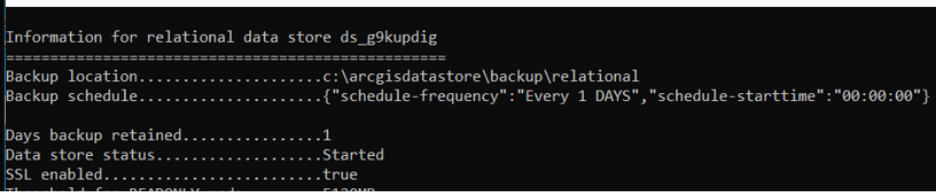
In the example below, the backup schedule was changed to one backup per day (daily backups of the ArcGIS Data Store), with a retention period set to one day.
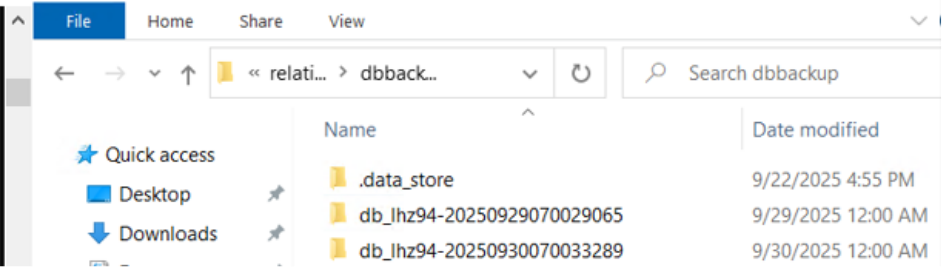
The expected behavior is for the system to always contain two backups based on the retention count schedule explained below, which would be one from today and one from yesterday, assuming both backups were completed successfully:
| Schedule | Backups | Count | ||
| Day 0 | db-lhz94...65 | 1 | ||
| Day 1 | db-lhz94...65 | db-lhz94...89 | 2 | |
| Day 2 | x | db-lhz94...89 | db-lhz94...113 | 2 |
The count of the retention period starts with Day 0 (at midnight). The next day (Day 1), another backup will be taken. The first one, taken on Day 0, will be retained as the system ensures it has two complete backups. On Day 2, at midnight, when the next backup is completed, the first one, taken on Day 0, will be deleted.
If the retention period was changed to two days, leaving the frequency of backups set to one, the following table shows the expected behavior:
| Schedule | Backups | Count | |||
| Day 0 | db_lhz94...65 | 1 | |||
| Day 1 | db_lhz94...65 | db_lhz94...89 | 2 | ||
| Day 2 | db_lhz94...65 | db_lhz94...89 | db-lhz94...113 | 3 | |
| Day 3 | x | db_lhz94...89 | db-lhz94...113 | db-lhz94...137 | 3 |
Note:
ArcGIS Data Store backups can consume significant disk space over time. To manage storage more efficiently, consider increasing the backup frequency while shortening the retention period. This approach ensures regular backups without accumulating excessive data.
Additionally, you can change the default backup location to a different server on the network that has ample available disk space and is not running any ArcGIS software, helping to isolate backup storage from production environments.
To learn more about managing ArcGIS Data Store backups, see the reference Manage ArcGIS Data Store backups.
Article ID: 000038632
- ArcGIS Data Store
Get support with AI
Resolve your issue quickly with the Esri Support AI Chatbot.


Discover more on this topic

Search for related information

Find training related to this topic

Explore ideas and give feedback
Get help from ArcGIS experts
Start chatting now