
PROBLEM
Vector tile package increases in size when upgrading from ArcGIS Pro 3.1.x and earlier to a later release
Description
After upgrading ArcGIS Pro to version 3.2 or later, creating or publishing vector tiles may take longer and result in larger files.
Cause
From ArcGIS Pro 3.2 release, the behavior of tile creation was changed such that an indexed cache will continue to split tiles based on user-specified minimum and maximum scales or zoom values until at least the corresponding minimum Level of Detail (LOD) is reached.
This may cause tiles to be created to larger LODs than before, increasing the file size of vector tile packages. This will also affect leaf tiles which will continue as regular tiles until all zoom thresholds have been met. As a result, the size of the vector tile cache and the processing times will increase when this occurs.
Benefits
Features will only be saved into vector tiles at the intended scales, for example if you have premium data that should only show at larger scales, vector tile creation now saves them only within the expected LODs rather than within leaf tiles at lower LODs. This is both easier to understand and design for, as well as facilitating a Premium or Freemium model.
Vector tiles created by ArcGIS Pro will be more compatible with non-Esri clients. In previous releases, the features that would display at scales larger than LOD16 were stored with key-value pairs using strings _minzoom and _maxzoom. This custom behavior allowed Esri clients to display features correctly at expected scales but incompatible, non-Esri, clients ignored these values causing features to appear at sooner (smaller) than expected scales.
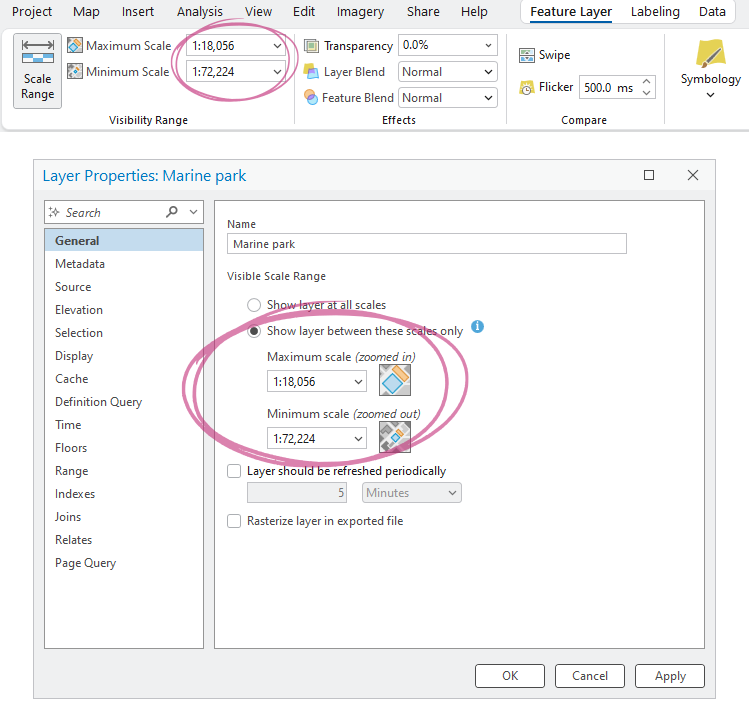
Scale ranges can be set in or read from symbol classes, label classes, or display filters, but most often they come from the feature layer properties.
Solution or Workaround
Features will only be saved into vector tiles at the intended scales, for example if you have premium data that should only show at larger scales, vector tile creation now saves them only within the expected LODs rather than within leaf tiles at lower LODs. This is both easier to understand and design for, as well as facilitating a Premium or Freemium model.
Vector tiles created by ArcGIS Pro will be more compatible with non-Esri clients. In previous releases, the features that would display at scales larger than LOD16 were stored with key-value pairs using strings _minzoom and _maxzoom. This custom behavior allowed Esri clients to display features correctly at expected scales but incompatible, non-Esri, clients ignored these values causing features to appear at sooner (smaller) than expected scales.
In practice
We now have a standardized approach where vector tiles are created from layers at each LOD from their minimum scale through to the largest scale deemed necessary by the tile index. Beyond that they are represented by overzooming a leaf tile through to the layer’s maximum scale. Minimum and maximum scale ranges are saved to the style from where they are read and honored on rendering. This is the same across all clients.
However, there are certain symbology and labelling options in Pro that are an exception to this rule and result in continued splitting of tile(s), which equates to the continued creation of tiles at higher LODs. The options that will cause this are:
- Display filters whose scale ranges include any scales that are larger than LOD16
- Polygon labels with a specified maximum scale larger than LOD16 that are set to either curved or straight (non-horizontal)
Workarounds
To avoid an increase in the number of tiles created, customers should check the minimum and maximum scale settings on their layers and when creating the final vector tile package. Moreover, to avoid an increase beyond LOD16, we suggest you look for non-horizontal polygon labels and display filters that may be the cause.
If possible, change polygon labels at scales larger than LOD16 to horizontal placement and ensure display filter scales are in-line with the exact scales of the final map to avoid unnecessary tile creation.
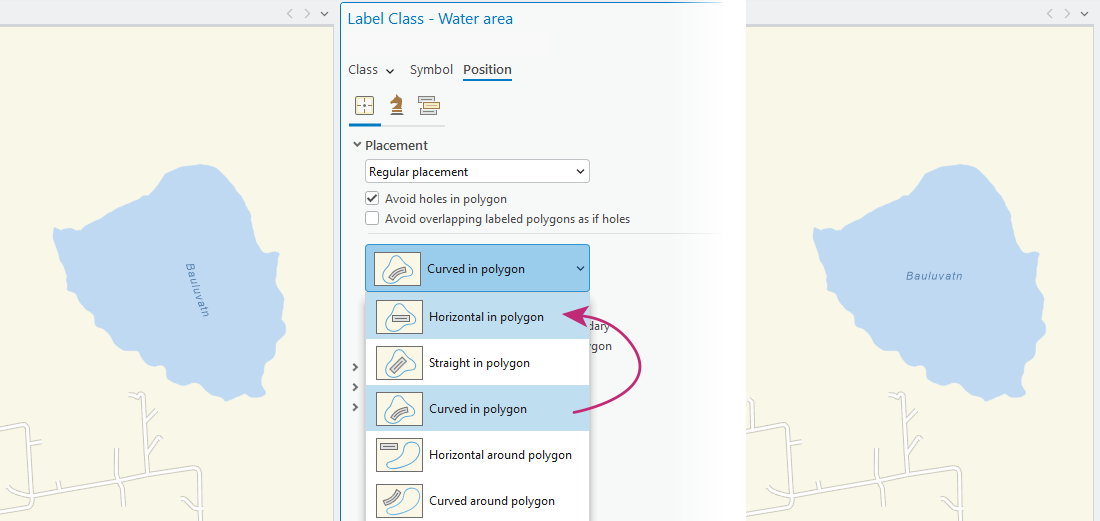
Polygon labels changed from curved or straight in polygon to Horizontal in polygon may eliminate the issue, as shown in the image above.
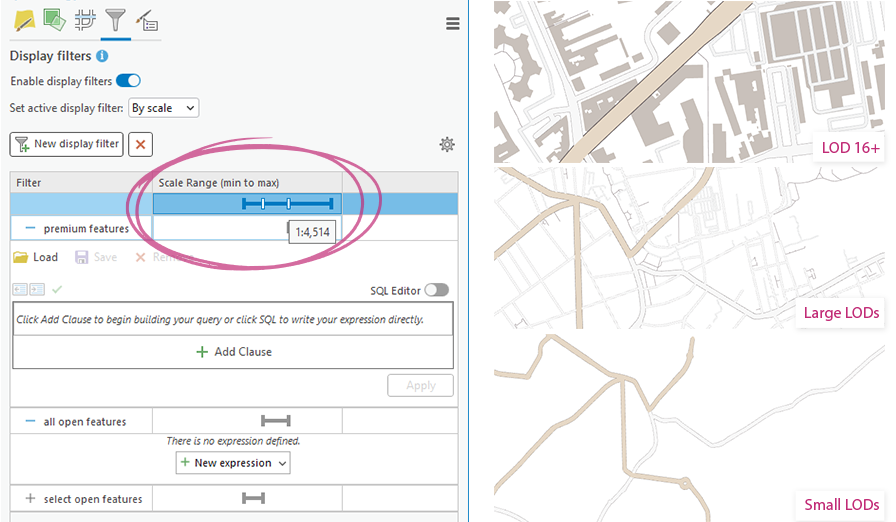
Ensure any display filters are set to either end at LOD16 or earlier (smaller), or that only the desired features continue beyond LOD16.
A final resort would be to create the vector tile package to a maximum LOD of your choosing and then edit the service to allow zooming beyond that LOD. To do so, ensure the Maximum Cached Scale in the Create Vector Tile Package tool dialogue is no larger than LOD16. Then after creation and publication, you can use the Vector Tile Style Editor to edit the “maxzoom” parameter of the map source and any relevant layers in the style JSON, updating them to whatever LOD you wish, thus forcing them to continue as leaf tiles.
Article ID: 000038039
- ArcGIS Pro
Get support with AI
Resolve your issue quickly with the Esri Support AI Chatbot.


Discover more on this topic

Search for related information

Find training related to this topic

Explore ideas and give feedback
Get help from ArcGIS experts
Start chatting now