
ERROR
Unable to access the Business Analyst Web App
Error Message
After setting up ArcGIS Business Analyst Enterprise, accessing the Business Analyst Web App from the Portal for ArcGIS app launcher fails, and an error similar to the following is returned:
This page can't be found
No webpage was found for the web address: https://<domain>/portal/apps/BA
HTTP ERROR 404
Cause
URLs are not redirected and/or updated from the portal admin page of the Business Analyst Web app.
Solution or Workaround
The ArcGIS Business Analyst Server role should be listed in ArcGIS Server Manager. Update the URLS from the portal admin page.
- Log in to the Portal Administrator Directory.
- Update the app info by clicking Security > OAuth > Update App Info.
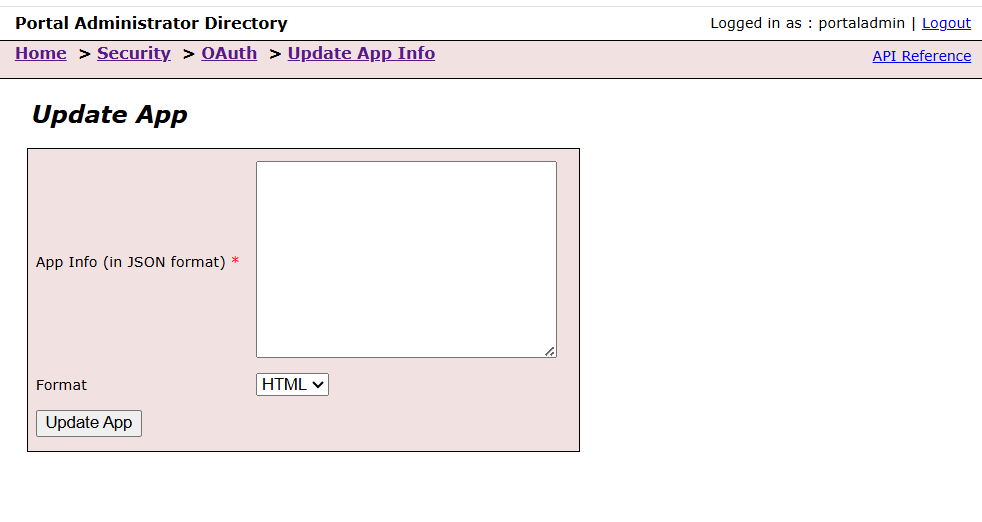
- Copy and paste the following JSON into the App Info section.
After pasting, make sure to replace the domain.com values under both http and https with your actual domain name. Click Update App.
   {
 "appId": "busanalystonline_2",
 "redirectURIs": [
   "https://*.arcgis.com",
   "https://*.arcgis.com",
   "https://*.domain.com",
   "https://*.domain.com",
   "urn:ietf:wg:oauth:2.0:oob"
 ]
}
- Access the Business Analyst web app from the app launcher or browse to:
https://<PortalName.domain.com>/WebAdaptor/apps/BA
Note:
Only portal members licensed to use the Business Analyst Web App can access it.
Article ID: 000032653
- ArcGIS Business Analyst Enterprise
- ArcGIS Business Analyst Web App
Get support with AI
Resolve your issue quickly with the Esri Support AI Chatbot.


Related Information
Discover more on this topic

Search for related information

Find training related to this topic

Explore ideas and give feedback
Get help from ArcGIS experts
Start chatting now