
PROBLEM
Truncated Tapestry Segment ID and Segment Name values for segment K7, Room to Roam, in local US 2025 Business Analyst dataset
Description
Tapestry segment K7 name and segment ID are truncated in the USA_Esri_2025 local Business Analyst dataset. This problem is limited to the local connected or installable dataset and does not exist in the ArcGIS Online, ArcGIS Business Analyst Web App or Geoenrichment service database.
Cause
The summarizations xml file contains two incorrect values, which result in truncated Segment ID and Segment name values for segment “K7, Room to Roam” to “K, Room to oam”.
Solution or Workaround
Overwriting the existing XML file titled US_summarizations_esri and clearing the dataset cache ensures that output data from your analysis returns accurate and complete Tapestry segment names and IDs.
To eliminate the problem in your local dataset, download and extract the updated copy of US_summarizations_esri.xml. Overwrite the existing file with the same name in the Demographic Data folder of the dataset path. To overwrite the existing file, drag the updated file into the Demographic Data folder and click Replace in the pop-up window.
For installed datasets, the default path to this folder is:
C:\ArcGIS\Business Analyst\US_2025\Data\Demographic Data
If you connect to the dataset, navigate to the drive where the dataset is stored and click into the Demographic Data folder. Once the file has been overwritten, clear the dataset cache.
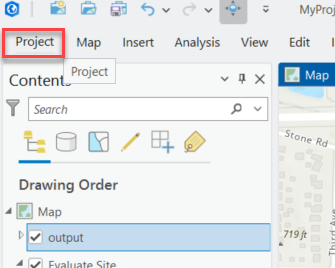
- Open ArcGIS Pro and click the Project tab.
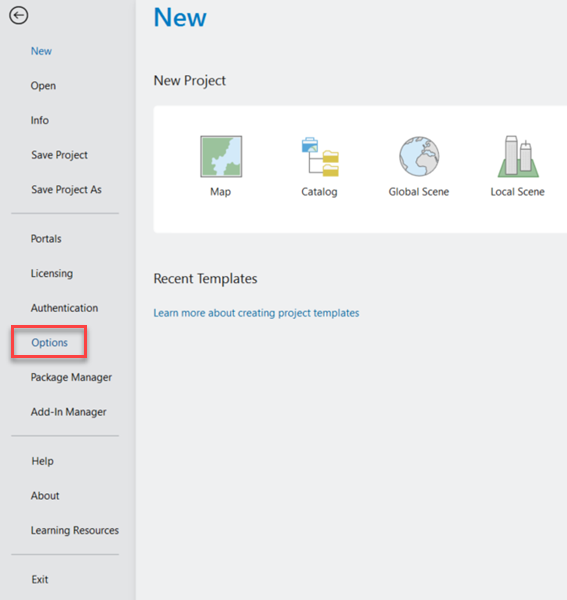
- Click Options on the left.
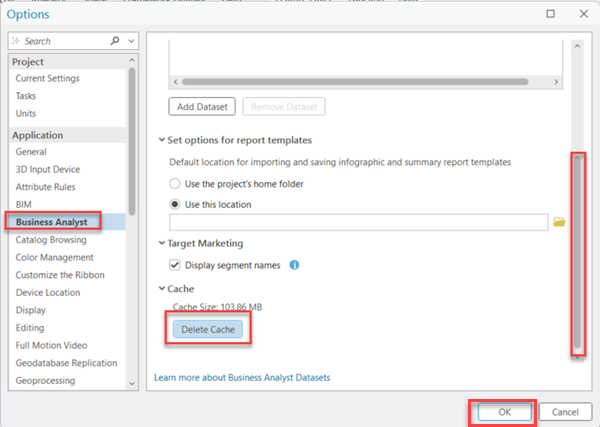
- In the Options window, click Business Analyst on the left, then use the vertical scrollbar on the right to access and click the Delete Cache button. Click OK.
Article ID: 000037425
- ArcGIS Business Analyst Pro
- ArcGIS Pro
Get support with AI
Resolve your issue quickly with the Esri Support AI Chatbot.


Related Information
Discover more on this topic

Search for related information

Find training related to this topic

Explore ideas and give feedback
Get help from ArcGIS experts
Start chatting now