
PROBLEM
WMS service fails to display in ArcGIS Online applications
Description
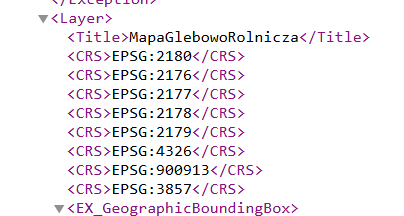
When the WMS service is added using the EPSG:900913 coordinate system instead of the expected EPSG:3857 (Web Mercator), although both codes refer to very similar projections, the difference in their identifiers can lead to rendering issues in ArcGIS Online applications.
As a result, the WMS layer does not display, even though it has been successfully added to the map, as shown in the image below.
Cause
When adding a WMS service, ArcGIS Online automatically selects one of the available coordinate reference systems (CRS) declared by the WMS server. If the server offers EPSG:900913 (an older, unofficial identifier for Web Mercator), ArcGIS Online may choose it instead of the recommended EPSG:3857.
Solution or Workaround
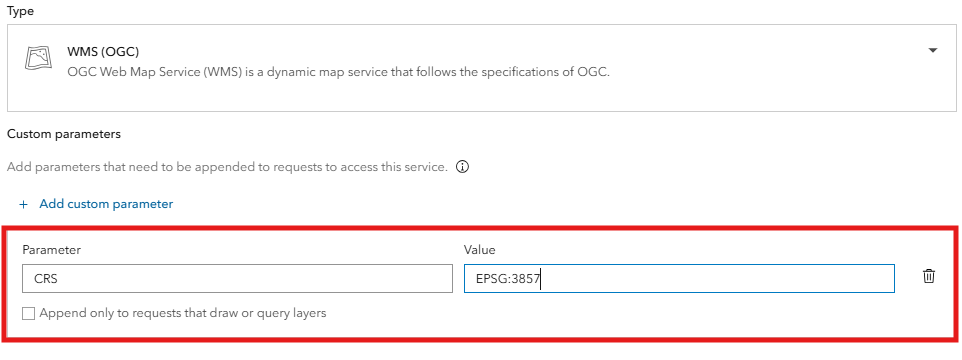
To ensure the WMS service displays correctly in ArcGIS Online applications, it should be added as a layer with the Add Custom Parameter option.
- for Parameter, use CRS
- for Value set it to EPSG:3857
Article ID: 000035857
- ArcGIS Online
Get support with AI
Resolve your issue quickly with the Esri Support AI Chatbot.


Discover more on this topic

Search for related information

Find training related to this topic

Explore ideas and give feedback
Get help from ArcGIS experts
Start chatting now